Url Editor PRO
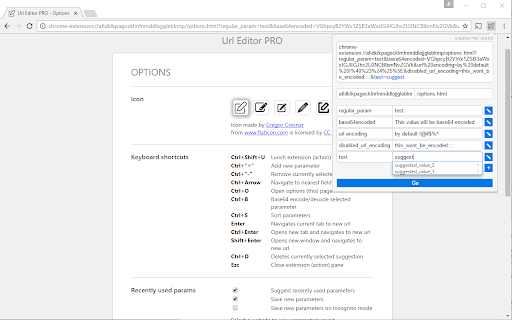
Url parser which makes editing complex URLs as easy as possible. Features: params decoding, auto-suggest, keyboard navigation..
Что такое Url Editor PRO?
Url Editor PRO - это расширение Chrome, разработанное Max Chodorowski, и его основная функция - "Url parser which makes editing complex URLs as easy as possible. Features: params decoding, auto-suggest, keyboard navigation..".
Снимки экрана расширения

Скачать файл CRX расширения Url Editor PRO
Скачайте файлы расширений Url Editor PRO в формате crx, установите расширения Chrome вручную в браузере или поделитесь файлами crx с друзьями, чтобы легко установить расширения Chrome.
Инструкции по использованию расширения
                        Features:
* parse url and show its chunks in easy to navigate fields
* automatic or manual redirections
* auto-refresh
* manual and automatic url-encoding/decoding parameters
* Base64 params encoding/decoding
* auto-suggest functionality
* suggestions manager (on options page)
* sorting params (easy to find the one you're looking for)
* keyboard shortcuts for all major actions
* open submitted url in current/new tab or new window
* open-source (feel free to contribute)
Основная информация о расширении
| Название |  Url Editor PRO Url Editor PRO |
| ID | maoigfcibanjdgnepaiiadjhgmejclea |
| Официальный URL | https://chromewebstore.google.com/detail/url-editor-pro/maoigfcibanjdgnepaiiadjhgmejclea |
| Описание | Url parser which makes editing complex URLs as easy as possible. Features: params decoding, auto-suggest, keyboard navigation.. |
| Размер файла | 98.22 KB |
| Количество установок | 4,539 |
| Текущая Версия | 0.9.4.2 |
| Последнее Обновление | 2020-04-16 |
| Дата публикации | 2020-04-14 |
| Рейтинг | 4.56/5 Всего 9 оценок |
| Разработчик | Max Chodorowski |
| Тип оплаты | free |
| Поддерживаемые языки | en |
| manifest.json | |
{
    "update_url": "https:\/\/clients2.google.com\/service\/update2\/crx",
    "manifest_version": 2,
    "name": "Url Editor PRO",
    "description": "Url parser which makes editing complex URLs as easy as possible. Features: params decoding, auto-suggest, keyboard navigation..",
    "version": "0.9.4.2",
    "permissions": [
        "http:\/\/*\/*",
        "https:\/\/*\/*",
        "tabs",
        "windows",
        "webRequest",
        "webRequestBlocking",
        "contextMenus"
    ],
    "icons": {
        "16": "img\/edit_16.png",
        "48": "img\/edit_32.png",
        "128": "img\/edit.png"
    },
    "browser_action": {
        "default_icon": "img\/edit_32.png",
        "default_popup": "popup.html"
    },
    "options_page": "options.html",
    "background": {
        "scripts": [
            "app.js",
            "background.js"
        ]
    },
    "commands": {
        "_execute_browser_action": {
            "suggested_key": {
                "default": "Ctrl+Shift+U"
            }
        },
        "GoToHomepage": {
            "suggested_key": {
                "default": "Ctrl+Shift+H",
                "mac": "Command+Shift+H"
            },
            "description": "Go to homepage (root path)"
        },
        "RedirectUseFirstRule": {
            "suggested_key": {
                "default": "Ctrl+Shift+Y",
                "mac": "Command+Shift+Y"
            },
            "description": "Redirect using first rule"
        }
    },
    "content_security_policy": "script-src 'self' https:\/\/www.google-analytics.com; object-src 'self'"
} | |