Right Click Opens Link New Tab Correct Order
Same as 'Right Click Opens Link in New Tab', but now when opening multiple tabs, the tabs are inserted in the correct order.
Что такое Right Click Opens Link New Tab Correct Order?
Right Click Opens Link New Tab Correct Order - это расширение Chrome, разработанное bgdam, и его основная функция - "Same as 'Right Click Opens Link in New Tab', but now when opening multiple tabs, the tabs are inserted in the correct order.".
Снимки экрана расширения
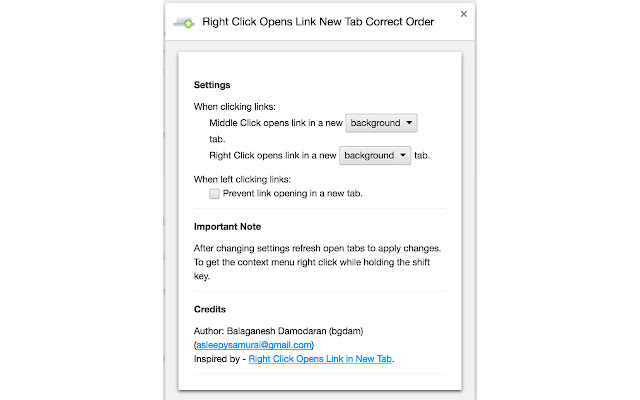
Скачать файл CRX расширения Right Click Opens Link New Tab Correct Order
Скачайте файлы расширений Right Click Opens Link New Tab Correct Order в формате crx, установите расширения Chrome вручную в браузере или поделитесь файлами crx с друзьями, чтобы легко установить расширения Chrome.
Инструкции по использованию расширения
                        Allows you to right click on links to open them in a new tab. An extension called 'Right Click Opens Link in New Tab' already allows you to do this exact same thing. Unfortunately it does not open the new tab in the same order as Chrome does. This extension opens the links you click in the same order that Chrome would open them by default.

Ex:
Right click 5 links on a page and the 5 links will be opened in 5 new tabs inserted in the order they were clicked on (left to right) next to the current tab.

Changelog:
0.0.8: Removed middle-click options from extension, since this can be configured in the browser itself. Middle-clicking now no longer opens two tabs.

0.0.7: Performance updates.

0.0.5-0.0.6: Firefox specific updates. Not available on Chrome store.

0.0.4: Specify openerTabId while opening tabs. This allows other extensions like Tree Style Tabs to maintain a mapping between the parent and child tabs.

0.0.3: If browser supports cookieStoreId, then the link is opened with the same cookieStoreId as current tab. Currently only applicable to Firefox.

0.0.2: No functionality changes or bugfixes. Updated manifest file for compatibility with Firefox. This extension now available on Firefox 57+ also.
Основная информация о расширении
| Название |  Right Click Opens Link New Tab Correct Order Right Click Opens Link New Tab Correct Order |
| ID | mhjkeimpgjokbjmioglhlngefbddppnn |
| Официальный URL | https://chrome.google.com/webstore/detail/right-click-opens-link-ne/mhjkeimpgjokbjmioglhlngefbddppnn |
| Описание | Same as 'Right Click Opens Link in New Tab', but now when opening multiple tabs, the tabs are inserted in the correct order. |
| Размер файла | 16.55 KB |
| Количество установок | 15,232 |
| Текущая Версия | 0.0.8 |
| Последнее Обновление | 2018-01-18 |
| Дата публикации | 2018-01-18 |
| Рейтинг | 4.05/5 Всего 88 оценок |
| Разработчик | bgdam |
| Электронная почта | [email protected] |
| Поддерживаемые языки | en |
| manifest.json | |
{
"update_url": "https:\/\/clients2.google.com\/service\/update2\/crx",
"applications": {
"gecko": {
"id": "[email protected]",
"strict_min_version": "42.0"
}
},
"background": {
"scripts": [
"js\/background.js"
]
},
"content_scripts": [
{
"matches": [
"http:\/\/*\/*",
"https:\/\/*\/*",
"ftp:\/\/*\/*"
],
"js": [
"js\/content_script.js"
],
"run_at": "document_start",
"all_frames": true
}
],
"manifest_version": 2,
"name": "Right Click Opens Link New Tab Correct Order",
"version": "0.0.8",
"description": "Same as 'Right Click Opens Link in New Tab', but now when opening multiple tabs, the tabs are inserted in the correct order.",
"icons": {
"16": "icons\/16.png",
"32": "icons\/32.png",
"48": "icons\/48.png",
"128": "icons\/128.png"
},
"author": "Balaganesh Damodaran | |