StudyBee
With StudyBee's assessment tools, you can assess student work directly in Google Classroom, and give feedback.
Что такое StudyBee?
StudyBee - это расширение Chrome, разработанное https://studybee.se, и его основная функция - "With StudyBee's assessment tools, you can assess student work directly in Google Classroom, and give feedback.".
Снимки экрана расширения
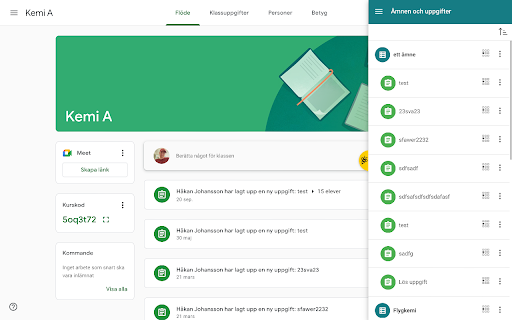
Скачать файл CRX расширения StudyBee
Скачайте файлы расширений StudyBee в формате crx, установите расширения Chrome вручную в браузере или поделитесь файлами crx с друзьями, чтобы легко установить расширения Chrome.
Инструкции по использованию расширения
                        StudyBee provides additional functionality to Google Classroom.

For teachers, students and other educators.
Основная информация о расширении
| Название |  StudyBee StudyBee |
| ID | nbhebloikpdgagghfhamjkbgfnobcfck |
| Официальный URL | https://chromewebstore.google.com/detail/studybee/nbhebloikpdgagghfhamjkbgfnobcfck |
| Описание | With StudyBee's assessment tools, you can assess student work directly in Google Classroom, and give feedback. |
| Размер файла | 7.7 MB |
| Количество установок | 20,000 |
| Текущая Версия | 2.2.24 |
| Последнее Обновление | 2024-03-06 |
| Дата публикации | 2020-04-07 |
| Рейтинг | 2.25/5 Всего 16 оценок |
| Разработчик | https://studybee.se |
| Электронная почта | [email protected] |
| Тип оплаты | free |
| Официальный сайт расширения | https://studybee.se/ |
| URL страницы помощи | https://studybee.se/instruktionsfilmer/ |
| URL страницы политики конфиденциальности | https://studybee.se/personuppgiftspolicy |
| Поддерживаемые языки | en,en-US,nl,fi,sv |
| manifest.json | |
{
    "update_url": "https:\/\/clients2.google.com\/service\/update2\/crx",
    "name": "__MSG_appName__",
    "version": "2.2.24",
    "manifest_version": 2,
    "description": "__MSG_appDescription__",
    "icons": {
        "16": "images\/icon-16.png",
        "128": "images\/icon-128.png"
    },
    "default_locale": "en",
    "background": {
        "scripts": [
            "scripts\/background.js"
        ],
        "persistent": false
    },
    "page_action": {
        "default_icon": {
            "19": "images\/icon-19.png",
            "38": "images\/icon-38.png"
        },
        "default_title": "__MSG_appName__"
    },
    "externally_connectable": {
        "matches": []
    },
    "permissions": [
        "storage",
        "notifications",
        "clipboardRead",
        "clipboardWrite",
        "tabs",
        "activeTab",
        "identity",
        "identity.email",
        "webNavigation",
        "http:\/\/*.google.com\/*",
        "https:\/\/*.google.com\/*",
        "http:\/\/*.studybee.io\/*",
        "https:\/\/*.studybee.io\/*"
    ],
    "content_security_policy": "script-src 'self' https:\/\/ssl.google-analytics.com; object-src 'self'",
    "web_accessible_resources": [
        "fonts\/*",
        "images\/*",
        "styles\/*"
    ],
    "content_scripts": [
        {
            "matches": [
                "https:\/\/classroom.google.com\/*",
                "https:\/\/docs.google.com\/document\/d\/*",
                "https:\/\/docs.google.com\/spreadsheets\/d\/*",
                "https:\/\/docs.google.com\/spreadsheets\/u\/*",
                "https:\/\/docs.google.com\/a\/*\/spreadsheets\/d\/*",
                "https:\/\/docs.google.com\/presentation\/d\/*",
                "https:\/\/docs.google.com\/drawings\/d\/*",
                "https:\/\/drive.google.com\/a\/*\/d\/*"
            ],
            "exclude_matches": [
                "https:\/\/classroom.google.com\/ineligible"
            ],
            "js": [
                "scripts\/contentscript-vendors.js",
                "scripts\/contentscript.js",
                "scripts\/contentscript.ng.js"
            ],
            "run_at": "document_idle",
            "all_frames": false
        }
    ],
    "oauth2": {
        "client_id": "397138885459-1bli926qeo17gnntsvh4ttlor0ai4ofn.apps.googleusercontent.com",
        "scopes": [
            "https:\/\/www.googleapis.com\/auth\/classroom.courses.readonly",
            "https:\/\/www.googleapis.com\/auth\/classroom.rosters.readonly",
            "https:\/\/www.googleapis.com\/auth\/classroom.coursework.me.readonly",
            "https:\/\/www.googleapis.com\/auth\/classroom.coursework.students.readonly",
            "https:\/\/www.googleapis.com\/auth\/classroom.profile.emails",
            "https:\/\/www.googleapis.com\/auth\/classroom.profile.photos",
            "https:\/\/www.googleapis.com\/auth\/classroom.push-notifications",
            "https:\/\/www.googleapis.com\/auth\/classroom.guardianlinks.me.readonly",
            "https:\/\/www.googleapis.com\/auth\/classroom.guardianlinks.students.readonly",
            "https:\/\/www.googleapis.com\/auth\/drive.file",
            "https:\/\/www.googleapis.com\/auth\/classroom.topics.readonly"
        ]
    }
} | |


