Salesforce Plus
Salesforce Plus helps you find Codes across Salesforce, find test class coverages, record analysis.
Что такое Salesforce Plus?
Salesforce Plus - это расширение Chrome, разработанное Santosh Pradhan, и его основная функция - "Salesforce Plus helps you find Codes across Salesforce, find test class coverages, record analysis.".
Снимки экрана расширения


Скачать файл CRX расширения Salesforce Plus
Скачайте файлы расширений Salesforce Plus в формате crx, установите расширения Chrome вручную в браузере или поделитесь файлами crx с друзьями, чтобы легко установить расширения Chrome.
Инструкции по использованию расширения
                        Salesforce Plues comes with a lot of features. It includes:

- Schema Explore: Find all the objects in Salesforce, and the fields related to them
- Code Search: List down all the Classes/Triggers/Pages/Components, and find a piece of code in just a second
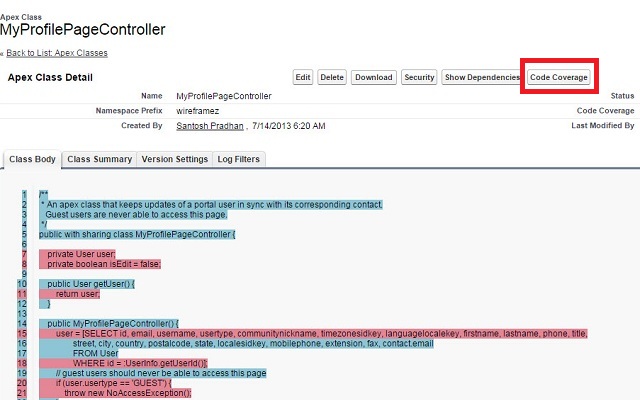
- Test Class Coverage: You do not need to go to 'Developer Console' to find the test coverage. Now, do it with a single button click on the Class itself

Just explore, and share your feedback and comments.
Основная информация о расширении
| Название |  Salesforce Plus Salesforce Plus |
| ID | nbkfjodmmamogffmbodkdbhfdllcmdkn |
| Официальный URL | https://chrome.google.com/webstore/detail/salesforce-plus/nbkfjodmmamogffmbodkdbhfdllcmdkn |
| Описание | Salesforce Plus helps you find Codes across Salesforce, find test class coverages, record analysis. |
| Размер файла | 337 KB |
| Количество установок | 527 |
| Текущая Версия | 1.0 |
| Последнее Обновление | 2014-12-03 |
| Дата публикации | 2014-12-03 |
| Рейтинг | 5.00/5 Всего 3 оценок |
| Разработчик | Santosh Pradhan |
| Тип оплаты | free |
| Поддерживаемые языки | en-US |
| manifest.json | |
{
    "update_url": "https:\/\/clients2.google.com\/service\/update2\/crx",
    "manifest_version": 2,
    "name": "Salesforce Plus",
    "version": "1.0",
    "description": "Salesforce Plus helps you find Codes across Salesforce, find test class coverages, record analysis.",
    "background": {
        "scripts": [
            "js\/background.js"
        ],
        "persistent": false
    },
    "icons": {
        "16": "images\/cloud_16.png",
        "48": "images\/cloud_48.png",
        "128": "images\/cloud_128.png"
    },
    "content_scripts": [
        {
            "matches": [
                "https:\/\/*.salesforce.com\/*"
            ],
            "css": [
                "css\/style.css"
            ],
            "js": [
                "js\/jquery.js",
                "js\/script.js",
                "js\/jquery.dataTables.js"
            ]
        }
    ],
    "permissions": [
        "https:\/\/*.salesforce.com\/*",
        "cookies",
        "storage",
        "declarativeContent"
    ]
} | |