Booksmart
Smart bookmarking. Add folders and bookmark your current tab to any folder with just one click.
Что такое Booksmart?
Booksmart - это расширение Chrome, разработанное Ana-Maria Iancu, и его основная функция - "Smart bookmarking. Add folders and bookmark your current tab to any folder with just one click.".
Снимки экрана расширения

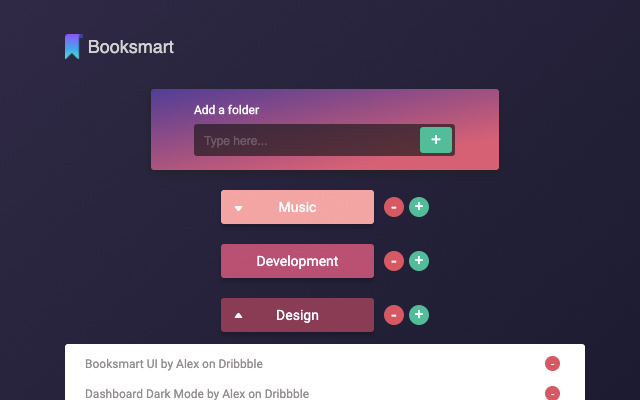
Скачать файл CRX расширения Booksmart
Скачайте файлы расширений Booksmart в формате crx, установите расширения Chrome вручную в браузере или поделитесь файлами crx с друзьями, чтобы легко установить расширения Chrome.
Инструкции по использованию расширения
                        With Booksmart you can now bookmark pages with only 2 clicks. Just add a folder, and click on the plus button next to it. Done! Your link is saved and organised in a folder. Easy to use and nice to look at.
You can add as many folders as you want and as many bookmarks in each folder.
Booksmart is all about making it easier to save links and access them later quickly.

Version 0.3.0 updates:
- design changes

Version 0.2.0 updates:
- bug fixes
- confirmation message when you delete a folder
Основная информация о расширении
| Название |  Booksmart Booksmart |
| ID | nlffaabjkkfkehhdmcljfpcipffhhkbj |
| Официальный URL | https://chrome.google.com/webstore/detail/booksmart/nlffaabjkkfkehhdmcljfpcipffhhkbj |
| Описание | Smart bookmarking. Add folders and bookmark your current tab to any folder with just one click. |
| Размер файла | 315 KB |
| Количество установок | 88 |
| Текущая Версия | 0.3.0 |
| Последнее Обновление | 2020-12-15 |
| Дата публикации | 2020-11-30 |
| Рейтинг | 4.78/5 Всего 9 оценок |
| Разработчик | Ana-Maria Iancu |
| Электронная почта | [email protected] |
| Тип оплаты | free |
| Поддерживаемые языки | en |
| manifest.json | |
{
    "update_url": "https:\/\/clients2.google.com\/service\/update2\/crx",
    "manifest_version": 2,
    "name": "Booksmart",
    "version": "0.3.0",
    "description": "Smart bookmarking. Add folders and bookmark your current tab to any folder with just one click.",
    "short_name": "B",
    "permissions": [
        "activeTab",
        "storage"
    ],
    "browser_action": {
        "default_popup": "popup.html",
        "default_title": "Booksmart",
        "default_icon": "favicon.ico"
    },
    "content_security_policy": "script-src 'self' ; object-src 'self'"
} | |