e-clock
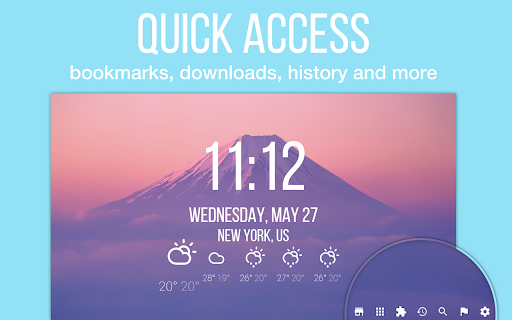
Replace new tab page with minimalistic and customizable clock and weather with quick access to apps, bookmarks, history and more
Что такое e-clock?
e-clock - это расширение Chrome, разработанное Yuriy Husnay, и его основная функция - "Replace new tab page with minimalistic and customizable clock and weather with quick access to apps, bookmarks, history and more".
Снимки экрана расширения



Скачать файл CRX расширения e-clock
Скачайте файлы расширений e-clock в формате crx, установите расширения Chrome вручную в браузере или поделитесь файлами crx с друзьями, чтобы легко установить расширения Chrome.
Инструкции по использованию расширения
                        e-clock is a new tab replacement which shows you the current time and the weather. Lets you completely customize its look and feel.

★Minimal design, decent level of customization★
★Simple elegant, runs well★
★Funky and very comfortable★

Features:
 ✔ current time and date in 24 or 12 hour format
 ✔ local weather forecast
 ✔ quick access to default apps, bookmarks, history and more
 ✔ plenty of customization options(backgrounds, colors, fonts, etc.)


If you have any idea, feature request, question or found a bug, please, add your feedback so I can improve e-clock.
Основная информация о расширении
| Название |  e-clock e-clock |
| ID | ojhhcfhabhligodffabdhcaoicecaboo |
| Официальный URL | https://chromewebstore.google.com/detail/e-clock/ojhhcfhabhligodffabdhcaoicecaboo |
| Описание | Replace new tab page with minimalistic and customizable clock and weather with quick access to apps, bookmarks, history and more |
| Размер файла | 19.55 MB |
| Количество установок | 20,000 |
| Текущая Версия | 3.6.1 |
| Последнее Обновление | 2019-10-15 |
| Дата публикации | 2019-10-15 |
| Рейтинг | 4.65/5 Всего 719 оценок |
| Разработчик | Yuriy Husnay |
| Тип оплаты | free |
| Поддерживаемые языки | en,uk |
| manifest.json | |
{
    "update_url": "https:\/\/clients2.google.com\/service\/update2\/crx",
    "manifest_version": 2,
    "name": "e-clock",
    "version": "3.6.1",
    "description": "__MSG_i18nShortDescription__",
    "default_locale": "en",
    "chrome_url_overrides": {
        "newtab": "index.html"
    },
    "icons": {
        "48": "img\/icons\/icon48.png",
        "128": "img\/icons\/icon128.png"
    },
    "permissions": [
        "storage",
        "geolocation"
    ],
    "offline_enabled": true,
    "content_security_policy": "script-src 'self' https:\/\/www.google-analytics.com; object-src 'self'"
} | |