Notion Syntax Highlighter
Improves Notion's code blocks syntax highlighting + adds tons of theme options
Что такое Notion Syntax Highlighter?
Notion Syntax Highlighter - это расширение Chrome, разработанное jserwatka.dev, и его основная функция - "Improves Notion's code blocks syntax highlighting + adds tons of theme options".
Снимки экрана расширения
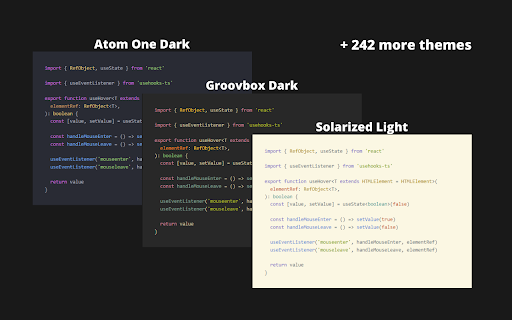
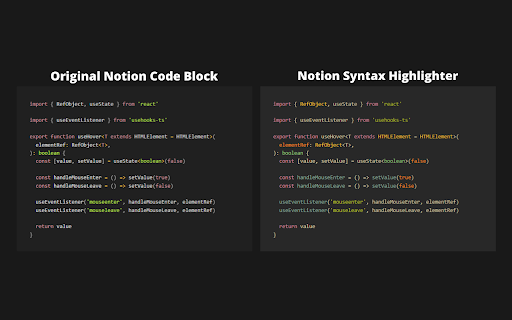


Скачать файл CRX расширения Notion Syntax Highlighter
Скачайте файлы расширений Notion Syntax Highlighter в формате crx, установите расширения Chrome вручную в браузере или поделитесь файлами crx с друзьями, чтобы легко установить расширения Chrome.
Инструкции по использованию расширения
                        🖼️ 245 available themes
🔧 Improved syntax highlighting
🩹 Minor fixes for code blocks
🔓  Open source & free - you can find github repo here:
       https://github.com/JSerwatka/notion-syntax-highlighter
_________________________________________________________

                               🛠️ HOW DOES IT WORK
_________________________________________________________

1. Upon installing the extension, the default theme (Gruvbox dark) will be automatically selected.
2. To change the theme, simply click on the extension's icon and select a different theme.
3. For convenience, only a few themes are visible in the main theme dropdown. To add more, click below the dropdown or right-click on the extension's icon and choose the "Options" menu. On the options page, select the themes you want to appear in your default list.

_________________________________________________________

                                🦁 FOR BRAVE USERS
_________________________________________________________

To make this extension work on Brave browser, please follow this instruction: https://github.com/JSerwatka/notion-syntax-highlighter#for-brave-users

_________________________________________________________

                                    🔐 PRIVACY POLICY
_________________________________________________________

Notion Syntax Highlighter extension does not analyze or send any user data. All the essential data needed for the extension to function, such as your selected themes and color scheme preferences, are stored locally within your browser.


_________________________________________________________

                          🎁 SUPPORT & CONTRIBUTE
_________________________________________________________

This extension requires thorough testing, so if you encounter any issues, please report them as bugs here:
https://github.com/JSerwatka/notion-syntax-highlighter/issues

You can support this project by:
❤️ Rating it
🤗 Proposing changes and contributing to its development
🐛 Reporting any bugs you encounter


_________________________________________________________

                                    🐛 KNOWN ISSUES
_________________________________________________________

Up-to-date issue list can be found here:
https://github.com/JSerwatka/notion-syntax-highlighter#known-issues

_________________________________________________________

                                🚀 Future Improvements
_________________________________________________________

- Resolve performance issues related to editing large code blocks
- Add shadow and rounded borders (configurable in settings)
- Add line numbers (configurable in settings)
- Allow line height customization (configurable in settings)
- Support prettier and other code formatters
- Simplify the process of adding new themes
Основная информация о расширении
| Название |  Notion Syntax Highlighter Notion Syntax Highlighter |
| ID | omapdeaklaaabcegmdikkciplbgignak |
| Официальный URL | https://chromewebstore.google.com/detail/notion-syntax-highlighter/omapdeaklaaabcegmdikkciplbgignak |
| Описание | Improves Notion's code blocks syntax highlighting + adds tons of theme options |
| Размер файла | 168 KB |
| Количество установок | 258 |
| Текущая Версия | 0.0.3 |
| Последнее Обновление | 2024-03-07 |
| Дата публикации | 2023-07-07 |
| Рейтинг | 5.00/5 Всего 3 оценок |
| Разработчик | jserwatka.dev |
| Электронная почта | [email protected] |
| Тип оплаты | free |
| Официальный сайт расширения | https://github.com/JSerwatka/notion-syntax-highlighter |
| URL страницы помощи | https://github.com/JSerwatka/notion-syntax-highlighter/issues |
| URL страницы политики конфиденциальности | https://github.com/JSerwatka/notion-syntax-highlighter/blob/master/privacy-policy.md |
| Поддерживаемые языки | en |
| manifest.json | |
{
    "update_url": "https:\/\/clients2.google.com\/service\/update2\/crx",
    "name": "Notion Syntax Highlighter",
    "description": "Improves Notion's code blocks syntax highlighting + adds tons of theme options",
    "version": "0.0.3",
    "manifest_version": 3,
    "permissions": [
        "storage"
    ],
    "icons": {
        "16": "img\/logo-16.png",
        "32": "img\/logo-32.png",
        "48": "img\/logo-48.png",
        "128": "img\/logo-128.png"
    },
    "action": {
        "default_popup": "popup.html",
        "default_icon": "img\/logo-48.png"
    },
    "options_page": "options.html",
    "background": {
        "service_worker": "service-worker-loader.js",
        "type": "module"
    },
    "content_scripts": [
        {
            "js": [
                "assets\/index.ts-loader.ab83a5cd.js"
            ],
            "matches": [
                "https:\/\/*.notion.so\/*"
            ],
            "run_at": "document_start"
        }
    ],
    "web_accessible_resources": [
        {
            "matches": [],
            "resources": [
                "img\/logo-16.png",
                "img\/logo-32.png",
                "img\/logo-48.png",
                "img\/logo-128.png"
            ],
            "use_dynamic_url": false
        },
        {
            "matches": [
                "https:\/\/*.notion.so\/*"
            ],
            "resources": [
                "assets\/chunk-d1255eab.js",
                "assets\/chunk-fadedf14.js",
                "assets\/chunk-ffcfbdba.js",
                "assets\/chunk-db543da2.js"
            ],
            "use_dynamic_url": true
        }
    ]
} | |