Multiple File Download
This extension enables the user to select all the documents present in the web page for download.
Что такое Multiple File Download?
Multiple File Download - это расширение Chrome, разработанное prabhushan, и его основная функция - "This extension enables the user to select all the documents present in the web page for download.".
Снимки экрана расширения

Скачать файл CRX расширения Multiple File Download
Скачайте файлы расширений Multiple File Download в формате crx, установите расширения Chrome вручную в браузере или поделитесь файлами crx с друзьями, чтобы легко установить расширения Chrome.
Инструкции по использованию расширения
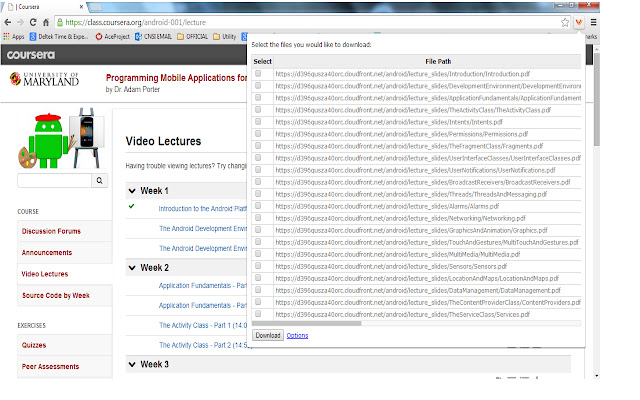
                        Many times we encounter situations where multiple files need to be downloaded from a web page. For example, user can download all the files in Coursera lessons in one shot. This would save lot of time.

Multiple file downloader facilitates the same. It scans through the web page and displays all the files, which user can download. User can select multiple files and click download.
It allows user to customize what file extensions should be downloaded in the web page.The user can also add custom extensions using the options page. User can also decide whether files need to be downloaded to default folder set in Chrome browser or prompt for each file.
BENEFITS FOR END USERS
1) Multi Select files in one go
2) Customise and also add your own extensions to download
KNOWN ISSUE
The extension scans for hyperlink across the web page. As per the design of the page, the hyperlink can be a button or image or both. So there are chances that duplicate links can appear on the extension.
Основная информация о расширении
| Название |  Multiple File Download Multiple File Download |
| ID | opncjdadngnekakilfcgjlgbmekljdbm |
| Официальный URL | https://chrome.google.com/webstore/detail/multiple-file-download/opncjdadngnekakilfcgjlgbmekljdbm |
| Описание | This extension enables the user to select all the documents present in the web page for download. |
| Размер файла | 154 KB |
| Количество установок | 10,000 |
| Текущая Версия | 1.3 |
| Последнее Обновление | 2014-09-09 |
| Дата публикации | 2014-09-09 |
| Рейтинг | 2.56/5 Всего 55 оценок |
| Разработчик | prabhushan |
| Тип оплаты | free |
| Поддерживаемые языки | en-US |
| manifest.json | |
{
"update_url": "https:\/\/clients2.google.com\/service\/update2\/crx",
"manifest_version": 2,
"name": "Multiple File Download",
"description": "This extension enables the user to select all the documents present in the web page for download. ",
"short_name": "File download",
"version": "1.3",
"background": {
"page": "popup.html"
},
"icons": {
"16": "sonicdownload.png",
"48": "sonicdownload.png",
"128": "sonicdownload.png"
},
"permissions": [
"tabs",
" | |