WordComplex (English Dictionary)
Add extra meaning to your web browsing. Look up for definitions while you are on web.
Vad är WordComplex (English Dictionary)?
WordComplex (English Dictionary) är en Chrome-tillägg utvecklad av Rajdeep Chauhan, och dess huvudfunktion är "Add extra meaning to your web browsing. Look up for definitions while you are on web.".
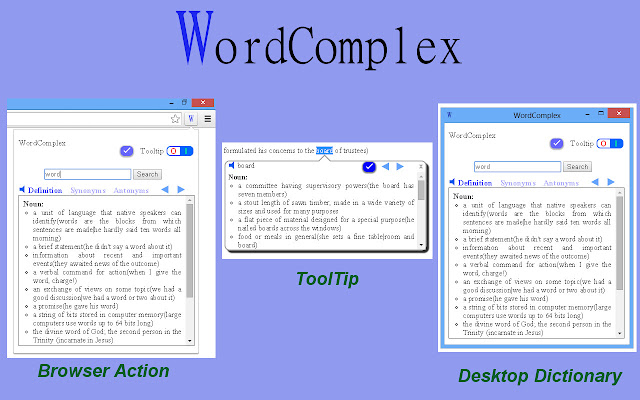
Tilläggsskärmbilder

Ladda ner WordComplex (English Dictionary)-förlängningens CRX-fil
Ladda ner WordComplex (English Dictionary)-filändelser i crx-format, installera Chrome-tillägg manuellt i webbläsaren eller dela crx-filerna med vänner för att enkelt installera Chrome-tillägg.
Användarmanual för Tillägg
                        Double click on any word to look up its definition while you are browsing. Look up for definitions in WordComplex browser action and open desktop dictionary by clicking wordcomplex icon.
You can go forward and backward in your currently searched words.
Save the words to look up in future.
Grundläggande Information om Tillägg
| Namn |  WordComplex (English Dictionary) WordComplex (English Dictionary) |
| ID | abiafidebmalgeploojmmpaplaglhhaf |
| Officiell webbadress | https://chrome.google.com/webstore/detail/wordcomplex-english-dicti/abiafidebmalgeploojmmpaplaglhhaf |
| Beskrivning | Add extra meaning to your web browsing. Look up for definitions while you are on web. |
| Filstorlek | 73.07 KB |
| Antal Installationer | 234 |
| Aktuell Version | 2.1 |
| Senast Uppdaterad | 2019-05-19 |
| Publiceringsdatum | 2019-05-19 |
| Betyg | 4.00/5 Totalt 4 Betyg |
| Utvecklare | Rajdeep Chauhan |
| Betalningssätt | free |
| Stödda Språk | en |
| manifest.json | |
{
    "update_url": "https:\/\/clients2.google.com\/service\/update2\/crx",
    "manifest_version": 2,
    "name": "WordComplex (English Dictionary)",
    "description": "Add extra meaning to your web browsing. Look up for definitions while you are on web.",
    "version": "2.1",
    "short_name": "WC",
    "browser_action": {
        "default_icon": "icon128.png",
        "default_popup": "popup.html",
        "default_title": "WordComplex"
    },
    "icons": {
        "16": "icon16.png",
        "19": "icon19.png",
        "32": "icon32.png",
        "48": "icon48.png",
        "128": "icon128.png"
    },
    "content_scripts": [
        {
            "matches": [
                "http:\/\/*\/*",
                "https:\/\/*\/*"
            ],
            "css": [
                "tip.css"
            ],
            "js": [
                "content_script.js"
            ]
        }
    ],
    "background": {
        "scripts": [
            "eventPage.js"
        ],
        "persistent": false
    },
    "web_accessible_resources": [
        "speaker.jpg"
    ],
    "permissions": [
        "http:\/\/*\/*",
        "https:\/\/*\/*",
        "tts",
        "storage"
    ]
} | |