rPlanet Asset Summary
Why no tables
Vad är rPlanet Asset Summary?
rPlanet Asset Summary är en Chrome-tillägg utvecklad av the.nurbrun, och dess huvudfunktion är "Why no tables".
Tilläggsskärmbilder
Ladda ner rPlanet Asset Summary-förlängningens CRX-fil
Ladda ner rPlanet Asset Summary-filändelser i crx-format, installera Chrome-tillägg manuellt i webbläsaren eller dela crx-filerna med vänner för att enkelt installera Chrome-tillägg.
Användarmanual för Tillägg
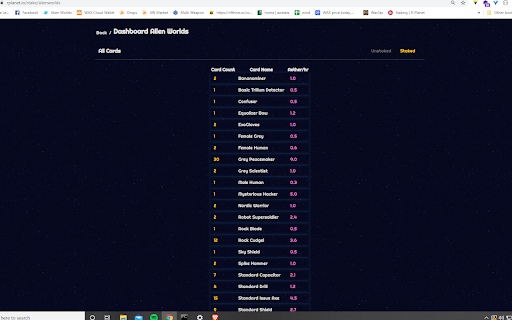
                        WHAT: This is a front-end modification that re-skins the current rplanet.io dashboard.

WHY: It can be hard to track assets owned on R-Planet (rplanet.io) with the current dashboard layout. For example, it is hard to tell how many of asset "X" you own and how much Aether/hour is generated from your position in asset "X". The purpose is to remove images, sort alphabetically and sum Aether income generated per hour.

HOW: This extension modifies HTML (ONLY) on the R Planet staking rewards page. This extension does not require any logins and is simply a front-end skin for an already existing platform. No data is stored, nor sent. The functionality of this extension will grow with R Planets new features until the dashboard is updated and becomes more descriptive.

**This extension is compatible with ALL supported R Planet stake-able assets.**
Grundläggande Information om Tillägg
| Namn |  rPlanet Asset Summary rPlanet Asset Summary |
| ID | aecnhcpcmoegapdipkefakofladpknle |
| Officiell webbadress | https://chromewebstore.google.com/detail/rplanet-asset-summary/aecnhcpcmoegapdipkefakofladpknle |
| Beskrivning | Why no tables |
| Filstorlek | 15.81 KB |
| Antal Installationer | 27 |
| Aktuell Version | 1.0 |
| Senast Uppdaterad | 2021-04-20 |
| Publiceringsdatum | 2021-04-18 |
| Utvecklare | the.nurbrun |
| E-post | [email protected] |
| Betalningssätt | free |
| Stödda Språk | en-US |
| manifest.json | |
{
    "update_url": "https:\/\/clients2.google.com\/service\/update2\/crx",
    "name": "rPlanet Asset Summary",
    "description": "Why no tables",
    "version": "1.0",
    "manifest_version": 3,
    "background": {
        "service_worker": "background.js"
    },
    "options_page": "options.html",
    "permissions": [
        "activeTab",
        "scripting"
    ],
    "action": {
        "default_popup": "popup.html",
        "default_icon": {
            "16": "\/images\/logo-16.png",
            "32": "\/images\/logo-32.png",
            "48": "\/images\/logo-48.png",
            "128": "\/images\/logo-128.png"
        }
    },
    "icons": {
        "16": "\/images\/logo-16.png",
        "32": "\/images\/logo-32.png",
        "48": "\/images\/logo-48.png",
        "128": "\/images\/logo-128.png"
    }
} | |