AnyTime
Seamlessly convert time zones and add to your calendar with AnyTime.
Vad är AnyTime?
AnyTime är en Chrome-tillägg utvecklad av shaoruu, och dess huvudfunktion är "Seamlessly convert time zones and add to your calendar with AnyTime.".
Tilläggsskärmbilder


Ladda ner AnyTime-förlängningens CRX-fil
Ladda ner AnyTime-filändelser i crx-format, installera Chrome-tillägg manuellt i webbläsaren eller dela crx-filerna med vänner för att enkelt installera Chrome-tillägg.
Användarmanual för Tillägg
                        Converting time zones is a pain. So many websites, extensions, and confusions.

Not with AnyTime.

AnyTime is your go-to time converter that works perfectly with your workflow.

⏳ Convert Time
- Highlight the time or open the extension

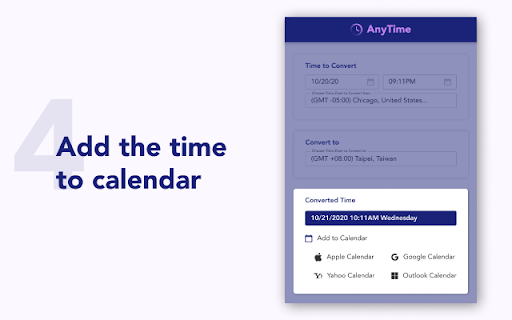
📆 Add to Calendar
- Add to any of your calendar (Google, Apple, Yahoo, Outlook)

🔥 To help us improve, we would love to hear your feedback and any suggestions for future updates!
Grundläggande Information om Tillägg
| Namn |  AnyTime AnyTime |
| ID | afenjmeaoeobpikeliigimidhakelggd |
| Officiell webbadress | https://chromewebstore.google.com/detail/anytime/afenjmeaoeobpikeliigimidhakelggd |
| Beskrivning | Seamlessly convert time zones and add to your calendar with AnyTime. |
| Filstorlek | 2.01 MB |
| Antal Installationer | 78 |
| Aktuell Version | 0.0.2 |
| Senast Uppdaterad | 2020-10-18 |
| Publiceringsdatum | 2020-10-12 |
| Betyg | 5.00/5 Totalt 1 Betyg |
| Utvecklare | shaoruu |
| E-post | [email protected] |
| Betalningssätt | free |
| Stödda Språk | en-US |
| manifest.json | |
{
    "update_url": "https:\/\/clients2.google.com\/service\/update2\/crx",
    "name": "AnyTime",
    "short_name": "AnyTime",
    "version": "0.0.2",
    "description": "Seamlessly convert time zones and add to your calendar with AnyTime.",
    "manifest_version": 2,
    "icons": {
        "128": "logo.png"
    },
    "browser_action": {
        "default_popup": "index.html",
        "default_title": "AnyTime Popup"
    },
    "background": {
        "scripts": [
            "\/static\/js\/background.js"
        ]
    },
    "web_accessible_resources": [
        "\/static\/css\/*.css",
        "\/static\/media\/*.png"
    ],
    "permissions": [
        "storage",
        "contextMenus",
        "notifications",
        "geolocation"
    ]
} | |