Rax Developer Tools
Adds Rax debugging tools to the Chrome Developer Tools.
Vad är Rax Developer Tools?
Rax Developer Tools är en Chrome-tillägg utvecklad av raxjs, och dess huvudfunktion är "Adds Rax debugging tools to the Chrome Developer Tools.".
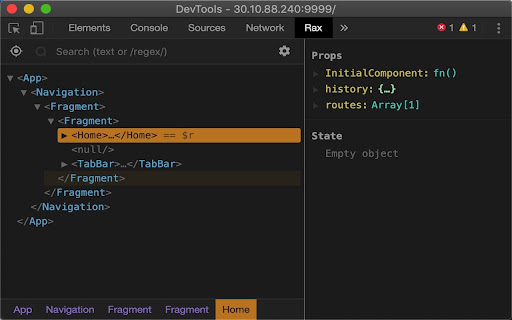
Tilläggsskärmbilder
Ladda ner Rax Developer Tools-förlängningens CRX-fil
Ladda ner Rax Developer Tools-filändelser i crx-format, installera Chrome-tillägg manuellt i webbläsaren eller dela crx-filerna med vänner för att enkelt installera Chrome-tillägg.
Användarmanual för Tillägg
Rax Developer Tools lets you inspect the Rax component's structure, props and state. Grundläggande Information om Tillägg
| Namn |  Rax Developer Tools Rax Developer Tools |
| ID | anpeoinhjjligmgoiepbnigjhmijblff |
| Officiell webbadress | https://chromewebstore.google.com/detail/rax-developer-tools/anpeoinhjjligmgoiepbnigjhmijblff |
| Beskrivning | Adds Rax debugging tools to the Chrome Developer Tools. |
| Filstorlek | 339 KB |
| Antal Installationer | 156 |
| Aktuell Version | 3.6.0 |
| Senast Uppdaterad | 2019-11-28 |
| Publiceringsdatum | 2019-11-27 |
| Betyg | 5.00/5 Totalt 1 Betyg |
| Utvecklare | raxjs |
| Betalningssätt | free |
| Tilläggswebbplats | https://rax.js.org/ |
| Stödda Språk | zh-CN |
| manifest.json | |
{
"update_url": "https:\/\/clients2.google.com\/service\/update2\/crx",
"manifest_version": 2,
"name": "Rax Developer Tools",
"description": "Adds Rax debugging tools to the Chrome Developer Tools.",
"version": "3.6.0",
"minimum_chrome_version": "49",
"icons": {
"16": "icons\/16-production.png",
"32": "icons\/32-production.png",
"48": "icons\/48-production.png",
"128": "icons\/128-production.png"
},
"browser_action": {
"default_icon": {
"16": "icons\/16-disabled.png",
"32": "icons\/32-disabled.png",
"48": "icons\/48-disabled.png",
"128": "icons\/128-disabled.png"
},
"default_popup": "popups\/disabled.html"
},
"devtools_page": "main.html",
"content_security_policy": "script-src 'self' 'unsafe-eval'; object-src 'self'",
"web_accessible_resources": [
"main.html",
"panel.html",
"build\/backend.js"
],
"background": {
"scripts": [
"build\/background.js"
],
"persistent": false
},
"permissions": [
"file:\/\/\/*",
"http:\/\/*\/*",
"https:\/\/*\/*"
],
"content_scripts": [
{
"matches": [
" | |




