Accupix
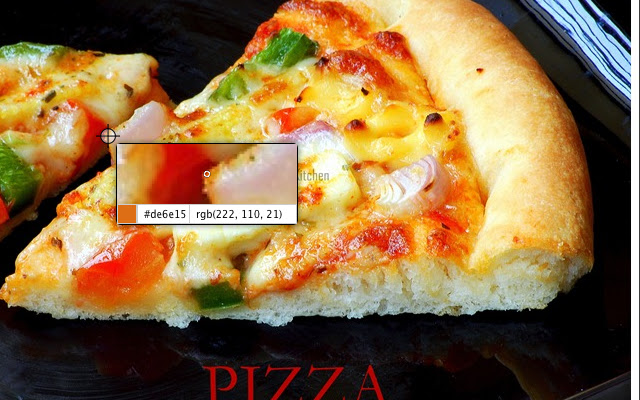
Provides an intuitive eyedropper to pick colors from webpages by providing a zoomed preview of the portion mouse points to.
Vad är Accupix?
Accupix är en Chrome-tillägg utvecklad av Sridhar PG, och dess huvudfunktion är "Provides an intuitive eyedropper to pick colors from webpages by providing a zoomed preview of the portion mouse points to.".
Tilläggsskärmbilder


Ladda ner Accupix-förlängningens CRX-fil
Ladda ner Accupix-filändelser i crx-format, installera Chrome-tillägg manuellt i webbläsaren eller dela crx-filerna med vänner för att enkelt installera Chrome-tillägg.
Användarmanual för Tillägg
                        Eyedropper for Google Chrome. The extension also automatically copies the selected hex color code value to clipboard.

Some of the shortcuts that will come handy:

- Use Scroll to Zoom In/Out
- Use Arrow keys to move the cursor to precisely match the required pixel
- Enter key picks the pixel
- Esc closes the picker

For Issues or Feature requests, mail to: [email protected]
Grundläggande Information om Tillägg
| Namn |  Accupix Accupix |
| ID | cnoeecignnjfddobmijconiockefppbg |
| Officiell webbadress | https://chrome.google.com/webstore/detail/accupix/cnoeecignnjfddobmijconiockefppbg |
| Beskrivning | Provides an intuitive eyedropper to pick colors from webpages by providing a zoomed preview of the portion mouse points to. |
| Filstorlek | 68.4 KB |
| Antal Installationer | 243 |
| Aktuell Version | 1.4.1 |
| Senast Uppdaterad | 2014-01-02 |
| Publiceringsdatum | 2014-01-02 |
| Betyg | 2.23/5 Totalt 13 Betyg |
| Utvecklare | Sridhar PG |
| E-post | [email protected] |
| Betalningssätt | free |
| Stödda Språk | en |
| manifest.json | |
{
"update_url": "https:\/\/clients2.google.com\/service\/update2\/crx",
"name": "Accupix",
"version": "1.4.1",
"manifest_version": 2,
"background": {
"page": "bg\/background.html"
},
"browser_action": {
"default_icon": "images\/picker_32.png",
"default_title": "Color Picker"
},
"content_scripts": [
{
"css": [
"content\/content.css"
],
"js": [
"tp\/jquery.js",
"tp\/jquery.ba-throttle-debounce.js",
"content\/content.js"
],
"matches": [
" | |