SimpleLogin:Receive & Send emails anonymously
Easily create a different email for each website to hide your real email. Protect your inbox against spams, phishing, data breaches
Vad är SimpleLogin:Receive & Send emails anonymously?
SimpleLogin:Receive & Send emails anonymously är en Chrome-tillägg utvecklad av https://simplelogin.io, och dess huvudfunktion är "Easily create a different email for each website to hide your real email. Protect your inbox against spams, phishing, data breaches".
Tilläggsskärmbilder
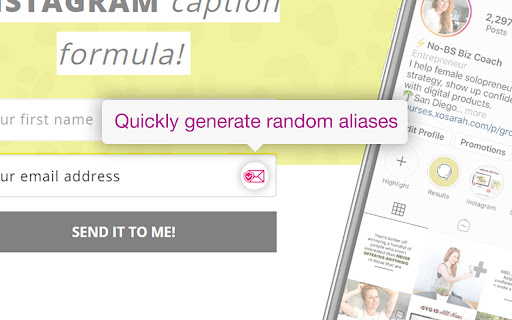


Ladda ner SimpleLogin:Receive & Send emails anonymously-förlängningens CRX-fil
Ladda ner SimpleLogin:Receive & Send emails anonymously-filändelser i crx-format, installera Chrome-tillägg manuellt i webbläsaren eller dela crx-filerna med vänner för att enkelt installera Chrome-tillägg.
Användarmanual för Tillägg
                        Use email ALIAS instead of your real email address to:
- defend your mailbox from spams, phishing and data breaches.
- protect your privacy from cross-site tracking.

1- Next time a website asks for your email address, give an alias instead of your real email.
2- All emails sent to an alias is *forwarded* to your personal email address.
3- Just hit "Reply" if you want to reply to a forwarded email: the reply is sent from your alias and your real email stays hidden. You can also easily send emails from your alias.

SimpleLogin is an *open-source* email alias solution that allows you to quickly create an email alias.

Use an email alias when:
- subscribing to a newsletter
- signing up for a new account
- giving your email to someone you don't trust.

Later on you can simply block an email alias if it's too spammy.

## Why SimpleLogin?

When you give away your personal email online, there is a good chance that your email address would end up with a spammer or leaked during a breach. You could check whether your email is leaked using website like https://haveibeenpwned.com

SimpleLogin could also help manage your business emails. If you own a domain and don't want to pay a full solution like GSuite, you could add the domain into SimpleLogin and create emails like [email protected], [email protected] with aliases. All our business emails (the @simplelogin.io) are actually aliases.

## What distinguishes SimpleLogin
- Generous free plan: there's no cap on bandwidth or number of replies/sends. The Free Plan is enough for protecting your personal email. Premium Plan targets at more "advanced" users with features like custom domain, unlimited alias, PGP, directories, etc.

- Fully open source: both SimpleLogin server and client code (browser extension, JS library) are open source so anyone can freely inspect and (hopefully) improve the code. You would not trust a blackbox to handle your emails, do you?

- No ads, no tracker.

- The only email forwarding solution that can be self hosted, i.e. you can run SimpleLogin on your server.

- Not just email alias: we are working on providing a similar technology for phone number and credit cards. Stay tuned!

- Easily export your data: allows you to change the service provider if someday you decide to leave SimpleLogin.
Grundläggande Information om Tillägg
| Namn |  SimpleLogin:Receive & Send emails anonymously SimpleLogin:Receive & Send emails anonymously |
| ID | dphilobhebphkdjbpfohgikllaljmgbn |
| Officiell webbadress | https://chromewebstore.google.com/detail/simpleloginreceive-send-e/dphilobhebphkdjbpfohgikllaljmgbn |
| Beskrivning | Easily create a different email for each website to hide your real email. Protect your inbox against spams, phishing, data breaches |
| Filstorlek | 604 KB |
| Antal Installationer | 71,205 |
| Aktuell Version | 2.11.0 |
| Senast Uppdaterad | 2024-02-16 |
| Publiceringsdatum | 2020-07-04 |
| Betyg | 4.90/5 Totalt 82 Betyg |
| Utvecklare | https://simplelogin.io |
| E-post | [email protected] |
| Betalningssätt | free |
| Tilläggswebbplats | https://simplelogin.io/ |
| Hjälpsida URL | https://simplelogin.io/faq |
| URL till Sekretesspolicy Sidan | https://simplelogin.io/privacy |
| Stödda Språk | en |
| manifest.json | |
{
    "update_url": "https:\/\/clients2.google.com\/service\/update2\/crx",
    "name": "SimpleLogin:Receive & Send emails anonymously",
    "short_name": "SimpleLogin",
    "description": "Easily create a different email for each website to hide your real email. Protect your inbox against spams, phishing, data breaches",
    "version": "2.11.0",
    "manifest_version": 2,
    "icons": {
        "16": "icons\/icon_16.png",
        "32": "icons\/icon_32.png",
        "48": "icons\/icon_48.png",
        "96": "icons\/icon_96.png",
        "128": "icons\/icon_128.png"
    },
    "permissions": [
        "activeTab",
        "storage",
        "contextMenus",
        "https:\/\/*.simplelogin.io\/*",
        "http:\/\/*\/*",
        "https:\/\/*\/*"
    ],
    "browser_action": {
        "default_title": "SimpleLogin",
        "default_popup": "popup\/popup.html"
    },
    "browser_specific_settings": {
        "gecko": {
            "id": "addon@simplelogin"
        }
    },
    "background": {
        "scripts": [
            "background.js"
        ]
    },
    "commands": {
        "generate-random-alias": {
            "suggested_key": {
                "default": "Ctrl+Shift+X"
            },
            "description": "Generate a random email alias"
        },
        "_execute_browser_action": {
            "suggested_key": {
                "default": "Ctrl+Shift+S"
            },
            "description": "Open the extension action menu"
        }
    }
} | |