Grade Calculator for Blackboard Learn
Find out what your grade would be with certain assignments added.
Vad är Grade Calculator for Blackboard Learn?
Grade Calculator for Blackboard Learn är en Chrome-tillägg utvecklad av Rohan Mathur, och dess huvudfunktion är "Find out what your grade would be with certain assignments added.".
Tilläggsskärmbilder

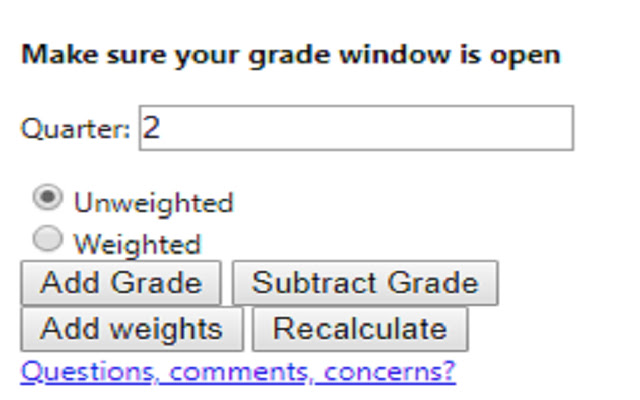
Ladda ner Grade Calculator for Blackboard Learn-förlängningens CRX-fil
Ladda ner Grade Calculator for Blackboard Learn-filändelser i crx-format, installera Chrome-tillägg manuellt i webbläsaren eller dela crx-filerna med vänner för att enkelt installera Chrome-tillägg.
Användarmanual för Tillägg
                        **MAJOR UPDATE**
I MADE AN ACTUAL GUI!! This is now an actually usable chrome extension and something I'm actually kind of proud of. I hope everyone finds it useful!

Thanks,
Rohan

This extension is meant to help you figure out what your total grade would be after an assignment is entered into the grade book.

Feedback Form:
https://goo.gl/forms/1fpCghIIhv49VfTr1
Grundläggande Information om Tillägg
| Namn |  Grade Calculator for Blackboard Learn Grade Calculator for Blackboard Learn |
| ID | eohcolhmjdncdmicjibnnjfocokolonj |
| Officiell webbadress | https://chrome.google.com/webstore/detail/grade-calculator-for-blac/eohcolhmjdncdmicjibnnjfocokolonj |
| Beskrivning | Find out what your grade would be with certain assignments added. |
| Filstorlek | 71.73 KB |
| Antal Installationer | 435 |
| Aktuell Version | 4.0.0 |
| Senast Uppdaterad | 2019-11-25 |
| Publiceringsdatum | 2019-11-21 |
| Betyg | 5.00/5 Totalt 3 Betyg |
| Utvecklare | Rohan Mathur |
| Betalningssätt | free |
| Hjälpsida URL | https://goo.gl/forms/1fpCghIIhv49VfTr1 |
| Stödda Språk | en |
| manifest.json | |
{
    "update_url": "https:\/\/clients2.google.com\/service\/update2\/crx",
    "name": "Grade Calculator for Blackboard Learn",
    "version": "4.0.0",
    "manifest_version": 2,
    "description": "Find out what your grade would be with certain assignments added.",
    "browser_action": {
        "default_icon": "icon.png",
        "default_popup": "index.html"
    },
    "icons": {
        "16": "icon.png",
        "48": "icon.png",
        "128": "icon.png"
    },
    "permissions": [
        "tabs",
        "activeTab"
    ]
} | |