Double Prime Video
A better user interface for Amazon Prime Video playback.
Vad är Double Prime Video?
Double Prime Video är en Chrome-tillägg utvecklad av Massive, och dess huvudfunktion är "A better user interface for Amazon Prime Video playback.".
Tilläggsskärmbilder
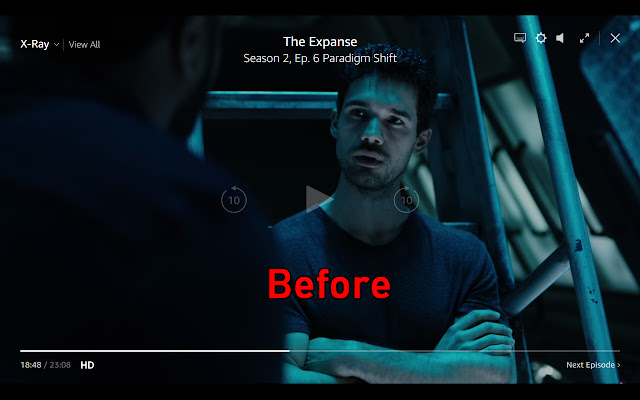

Ladda ner Double Prime Video-förlängningens CRX-fil
Ladda ner Double Prime Video-filändelser i crx-format, installera Chrome-tillägg manuellt i webbläsaren eller dela crx-filerna med vänner för att enkelt installera Chrome-tillägg.
Användarmanual för Tillägg
                        Double Prime Video is a stylesheet extension for Amazon Prime Video.

The goal was to create a less intrusive experience where simply checking time remaining did not make the viewing experience unpleasant by darkening it or overlaying controls over the action.

Exact differences:
- Mouse movement no longer darkens the screen to show you controls
- The play/pause button is now on the bottom bar
- Jump Forward/Back 10 seconds have been removed (just use the seek bar)
- Top right controls (options, volume, subtitle, fullscreen, next episode) have been moved to the control bar on the bottom
- The close button has been moved to the top left
- The X-Ray functionality has been moved further up to screen to improve visibility.
Grundläggande Information om Tillägg
| Namn |  Double Prime Video Double Prime Video |
| ID | fflofpacjgknpfbhboabihefnpkpglkh |
| Officiell webbadress | https://chrome.google.com/webstore/detail/double-prime-video/fflofpacjgknpfbhboabihefnpkpglkh |
| Beskrivning | A better user interface for Amazon Prime Video playback. |
| Filstorlek | 10.79 KB |
| Antal Installationer | 309 |
| Aktuell Version | 3.0 |
| Senast Uppdaterad | 2019-03-06 |
| Publiceringsdatum | 2019-03-06 |
| Betyg | 2.60/5 Totalt 5 Betyg |
| Utvecklare | Massive |
| Betalningssätt | free |
| Stödda Språk | en-US |
| manifest.json | |
{
    "update_url": "https:\/\/clients2.google.com\/service\/update2\/crx",
    "manifest_version": 2,
    "name": "Double Prime Video",
    "description": "A better user interface for Amazon Prime Video playback.",
    "version": "3.0",
    "browser_action": {
        "default_icon": "icon.png"
    },
    "content_scripts": [
        {
            "matches": [
                "https:\/\/www.amazon.com\/*"
            ],
            "css": [
                "doublePrimeTime.css"
            ]
        }
    ],
    "permissions": [
        "activeTab",
        "storage"
    ]
} | |