Save to 4Sync
Save files from the Internet to your 4Sync account with one click.
Vad är Save to 4Sync?
Save to 4Sync är en Chrome-tillägg utvecklad av http://4sync.com, och dess huvudfunktion är "Save files from the Internet to your 4Sync account with one click.".
Tilläggsskärmbilder
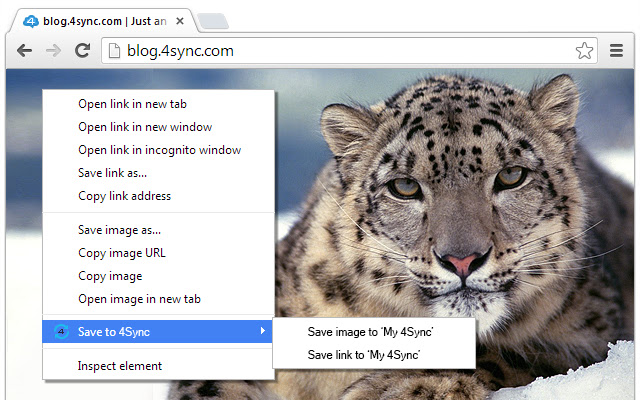


Ladda ner Save to 4Sync-förlängningens CRX-fil
Ladda ner Save to 4Sync-filändelser i crx-format, installera Chrome-tillägg manuellt i webbläsaren eller dela crx-filerna med vänner för att enkelt installera Chrome-tillägg.
Användarmanual för Tillägg
                        Save to 4Sync is an easy-to-use extension that lets you save any photos, audio and video file on the Web, including YouTube, Vimeo and Soundcloud directly to your 4sync account in one click! Once getting started, you will love using it as it makes it easier to capture all your experiences, ideas, and inspirations.


How does it work?

1. Right click the image or link to any file
2. Choose "Save to 4Sync" from context menu
3. Saving progress will show up.
4. When saving is completed you can easily manage or share your file from 4Sync account.

Once the file is uploaded, you can both manage and share it from your 4Sync account.
Grundläggande Information om Tillägg
| Namn |  Save to 4Sync Save to 4Sync |
| ID | fgdaadklfnpglbmpfhidlmaaplgcegpn |
| Officiell webbadress | https://chrome.google.com/webstore/detail/save-to-4sync/fgdaadklfnpglbmpfhidlmaaplgcegpn |
| Beskrivning | Save files from the Internet to your 4Sync account with one click. |
| Filstorlek | 96.96 KB |
| Antal Installationer | 92 |
| Aktuell Version | 1.4 |
| Senast Uppdaterad | 2014-09-03 |
| Publiceringsdatum | 2014-09-03 |
| Betyg | 3.33/5 Totalt 3 Betyg |
| Utvecklare | http://4sync.com |
| Betalningssätt | free |
| Stödda Språk | en |
| manifest.json | |
{
    "update_url": "https:\/\/clients2.google.com\/service\/update2\/crx",
    "name": "Save to 4Sync",
    "short_name": "Save to 4Sync",
    "version": "1.4",
    "manifest_version": 2,
    "description": "Save files from the Internet to your 4Sync account with one click.",
    "icons": {
        "16": "img\/16.png",
        "48": "img\/48.png",
        "59": "img\/59.png",
        "128": "img\/128.png"
    },
    "background": {
        "scripts": [
            "js\/chrome_ex_oauthsimple.js",
            "js\/chrome_ex_oauth.js",
            "js\/background.js"
        ]
    },
    "content_scripts": [
        {
            "matches": [
                "http:\/\/*\/*",
                "https:\/\/*\/*"
            ],
            "js": [
                "js\/jquery.js",
                "js\/services.js"
            ],
            "css": [
                "css\/services.css"
            ],
            "all_frames": true,
            "run_at": "document_end"
        }
    ],
    "web_accessible_resources": [
        "img\/vimeo4sync.png",
        "chrome_ex_oauth.html"
    ],
    "options_page": "options.html",
    "content_security_policy": "script-src 'self' https:\/\/ssl.google-analytics.com; object-src 'self'",
    "permissions": [
        "contextMenus",
        "tabs",
        "http:\/\/*\/*",
        "https:\/\/*\/*"
    ]
} | |