Georgia Tech New Tab
A better new tab experience with Georgia Tech
Vad är Georgia Tech New Tab?
Georgia Tech New Tab är en Chrome-tillägg utvecklad av http://brandthunder.com, och dess huvudfunktion är "A better new tab experience with Georgia Tech".
Tilläggsskärmbilder

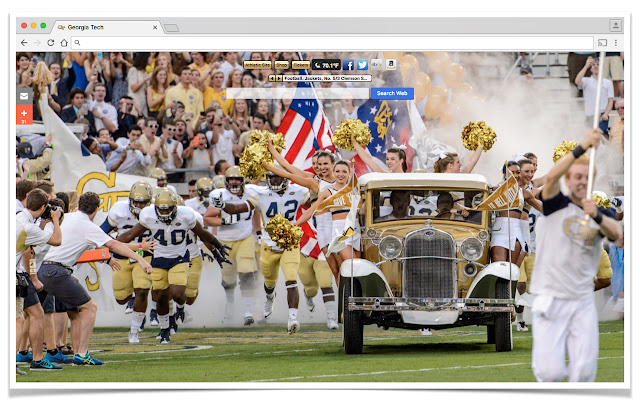
Ladda ner Georgia Tech New Tab-förlängningens CRX-fil
Ladda ner Georgia Tech New Tab-filändelser i crx-format, installera Chrome-tillägg manuellt i webbläsaren eller dela crx-filerna med vänner för att enkelt installera Chrome-tillägg.
Användarmanual för Tillägg
                        With this extension, you get different HD images of GEORGIA TECH on each new tab page!

If you have any questions or feedback support can be reached at [email protected]

With our extension, you get:
1:  A high-res new tab experience
2:  Simple, direct search from the new tab page via the tab search box
3:  Advertisements and buttons (links) for your favorite merchants right on the new tab page
4:  We are search and ad supported!  Thanks for your support...
Grundläggande Information om Tillägg
| Namn |  Georgia Tech New Tab Georgia Tech New Tab |
| ID | gfhfhkiogieediikeigcolhckmncpcce |
| Officiell webbadress | https://chrome.google.com/webstore/detail/georgia-tech-new-tab/gfhfhkiogieediikeigcolhckmncpcce |
| Beskrivning | A better new tab experience with Georgia Tech |
| Filstorlek | 25.6 KB |
| Antal Installationer | 44 |
| Aktuell Version | 4.0.9 |
| Senast Uppdaterad | 2022-01-22 |
| Publiceringsdatum | 2018-03-27 |
| Betyg | 2.33/5 Totalt 3 Betyg |
| Utvecklare | http://brandthunder.com |
| E-post | [email protected] |
| Betalningssätt | free |
| Hjälpsida URL | http://support.brandthunder.com |
| URL till Sekretesspolicy Sidan | http://brandthunder.com/privacy |
| Stödda Språk | en-US |
| manifest.json | |
{
    "update_url": "https:\/\/clients2.google.com\/service\/update2\/crx",
    "manifest_version": 2,
    "name": "Georgia Tech New Tab",
    "version": "4.0.9",
    "description": "A better new tab experience with Georgia Tech",
    "icons": {
        "16": "icon16.png",
        "32": "icon32.png",
        "48": "icon48.png",
        "128": "icon128.png"
    },
    "background": {
        "page": "background.html"
    },
    "browser_action": {
        "default_title": "Georgia Tech New Tab",
        "default_icon": {
            "16": "icon16.png",
            "32": "icon32.png"
        }
    },
    "chrome_url_overrides": {
        "newtab": "newtab.html"
    },
    "content_security_policy": "script-src 'self' https:\/\/ssl.google-analytics.com; object-src 'self'"
} | |