Rambler/start
Advanced New Tab with widgets, smart recommendations and favourite websites' selection
Vad är Rambler/start?
Rambler/start är en Chrome-tillägg utvecklad av https://rambler.ru, och dess huvudfunktion är "Advanced New Tab with widgets, smart recommendations and favourite websites' selection".
Tilläggsskärmbilder
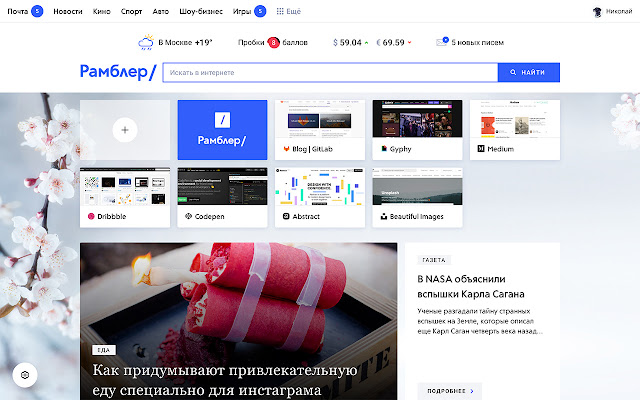

Ladda ner Rambler/start-förlängningens CRX-fil
Ladda ner Rambler/start-filändelser i crx-format, installera Chrome-tillägg manuellt i webbläsaren eller dela crx-filerna med vänner för att enkelt installera Chrome-tillägg.
Användarmanual för Tillägg
Make your browser’s New Tab useful: get weather forecast, exchange rates, traffic information and new mail alerts. Rambler/start will become even more personal, automatically adding your favourite websites to Quick Access Toolbar. In addition, this extension generates daily recommendations in accordance with your preferences. This extension accelerates your work with the browser: you can instantly access your web surfing and download history. Forget the complicated browser menu - Rambler/start will do everything faster! Grundläggande Information om Tillägg
| Namn |  Rambler/start Rambler/start |
| ID | gignacddmmmefainlfmefklgboboiebj |
| Officiell webbadress | https://chrome.google.com/webstore/detail/%D1%80%D0%B0%D0%BC%D0%B1%D0%BB%D0%B5%D1%80%D1%81%D1%82%D0%B0%D1%80%D1%82/gignacddmmmefainlfmefklgboboiebj |
| Beskrivning | Advanced New Tab with widgets, smart recommendations and favourite websites' selection |
| Filstorlek | 15.02 MB |
| Antal Installationer | 956 |
| Aktuell Version | 2.7.8 |
| Senast Uppdaterad | 2019-05-14 |
| Publiceringsdatum | 2019-05-14 |
| Betyg | 4.94/5 Totalt 18 Betyg |
| Utvecklare | https://rambler.ru |
| E-post | [email protected] |
| Betalningssätt | free |
| Tilläggswebbplats | http://soft.rambler.ru/start/ |
| Hjälpsida URL | https://help.rambler.ru/feedback/start/ |
| URL till Sekretesspolicy Sidan | http://help.rambler.ru/legal/1142?p=assist |
| Stödda Språk | en,ru |
| manifest.json | |
{
"update_url": "https:\/\/clients2.google.com\/service\/update2\/crx",
"manifest_version": 2,
"minimum_chrome_version": "46",
"name": "__MSG_name__",
"description": "__MSG_description__",
"permissions": [
" | |