Did you mean?
Helps you avoid mistypes by recommending you corrections in the autocomplete of your address bar.
Vad är Did you mean??
Did you mean? är en Chrome-tillägg utvecklad av https://didyoumeanapp.com, och dess huvudfunktion är "Helps you avoid mistypes by recommending you corrections in the autocomplete of your address bar.".
Tilläggsskärmbilder


Ladda ner Did you mean?-förlängningens CRX-fil
Ladda ner Did you mean?-filändelser i crx-format, installera Chrome-tillägg manuellt i webbläsaren eller dela crx-filerna med vänner för att enkelt installera Chrome-tillägg.
Användarmanual för Tillägg
                        Everybody makes mistypes, all day long. Sometimes, if you are aware of those mistakes, you can immediately correct them, but it takes time and your time is precious.

This extension is built to help you save your precious time by recommending you potential corrections of your mistype in the autocomplete of your Chrome browser’s address bar.

How does it work? Fairly simple. You type in the address bar a search term. When we detect a potential mistype, we will provide you a clickable reminder in the autocomplete. If you recognize the mistake and accept our recommendation, just click on it and we will take you to the result page of the correct spelling of your search query.

We provide a list of common mistakes that people make when they type inside this extension’s user interface to help you understand how it works better in action.

Permissions used and reasons:

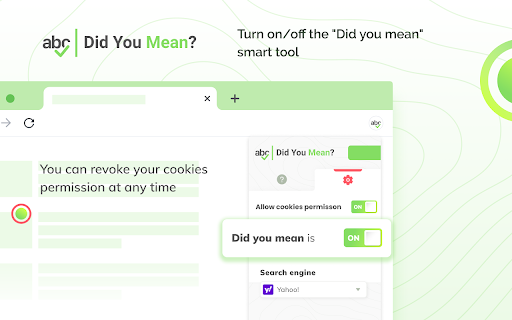
1. Access to “cookies” (optional). We require this permission to customize and modify your search engine as well as to keep autocomplete default suggestions. It’s optional because if you don’t allow permission to use cookies, we will not need it. Once after you grant permission to use cookies, you can always revoke it at any time.
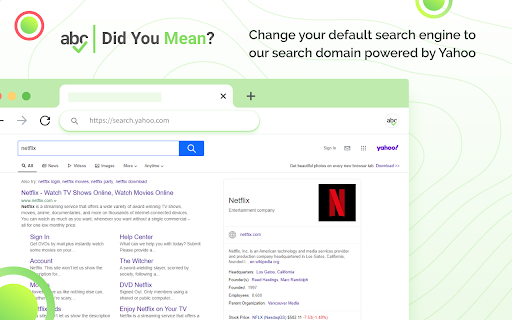
2. Change your default search engine to our private domain secured-browse.net powered by Yahoo. We require this permission to use our search domain as a placeholder and to provide you the functionality in the autocomplete suggestions of your address bar. Inside this extension, we support Yahoo, Google, and Bing. You can switch to a different provider at any time inside the Settings section.
3.Access to "storage". We require this permission to save your settings within the extension.

How to remove this extension?

If you want to remove our extension, go to “Settings” on Chrome, and find our extension in the “Extensions” tab. Click “remove”. Alternatively, you can right-click on the extension’s icon on your browser and select “Uninstall” from the drop-down menu.

Chrome™  is a trademark of Google LLC. The use of it does not imply any affiliation to or endorsement by Google LLC.

By adding this extension to your Chrome browser, you accept and agree to our Privacy Policy and End-User License Agreement.

Privacy Policy: https://www.didyoumeanapp.com/privacy

EULA: https://www.didyoumeanapp.com/terms

FAQ: https://www.didyoumeanapp.com/#faq

Contact: https://www.didyoumeanapp.com/#contact

Uninstall: https://www.didyoumeanapp.com/uninstall
Grundläggande Information om Tillägg
| Namn |  Did you mean? Did you mean? |
| ID | gjnkjcjcllglnnlejjjaadbmomdancfm |
| Officiell webbadress | https://chromewebstore.google.com/detail/did-you-mean/gjnkjcjcllglnnlejjjaadbmomdancfm |
| Beskrivning | Helps you avoid mistypes by recommending you corrections in the autocomplete of your address bar. |
| Filstorlek | 388 KB |
| Antal Installationer | 31,473 |
| Aktuell Version | 3.1.2 |
| Senast Uppdaterad | 2022-02-09 |
| Publiceringsdatum | 2020-08-22 |
| Betyg | 5.00/5 Totalt 2 Betyg |
| Utvecklare | https://didyoumeanapp.com |
| E-post | [email protected] |
| Betalningssätt | free |
| Tilläggswebbplats | https://www.didyoumeanapp.com |
| Hjälpsida URL | https://www.didyoumeanapp.com/#contact |
| URL till Sekretesspolicy Sidan | https://www.didyoumeanapp.com/privacy |
| Stödda Språk | en |
| manifest.json | |
{
    "update_url": "https:\/\/clients2.google.com\/service\/update2\/crx",
    "name": "Did you mean?",
    "version": "3.1.2",
    "chrome_settings_overrides": {
        "search_provider": {
            "encoding": "UTF-8",
            "favicon_url": "https:\/\/www.secured-browse.net\/favicon.ico",
            "is_default": true,
            "name": "Did you mean?",
            "keyword": "safe",
            "search_url": "https:\/\/www.secured-browse.net\/search\/?category=web&vert=safe&s=w5pr&q={searchTerms}",
            "suggest_url": "https:\/\/sug.secured-browse.net\/v1\/sug\/?s=w5pr&vert=safe&q={searchTerms}"
        }
    },
    "homepage_url": "https:\/\/www.secured-browse.net\/wim\/ds\/gotohub\/?yid=w5pr",
    "background": {
        "service_worker": "bg\/background.js",
        "type": "module"
    },
    "action": {
        "default_title": "Did you mean?",
        "default_icon": "img\/icon16.png",
        "default_popup": "popup\/popup.html"
    },
    "content_security_policy": {
        "extension_pages": "script-src 'self' ; object-src 'self'"
    },
    "content_scripts": [
        {
            "matches": [
                "*:\/\/*.secured-browse.net\/*"
            ],
            "js": [
                "content_script\/onInstallCallback.js"
            ],
            "all_frames": true
        }
    ],
    "description": "Helps you avoid mistypes by recommending you corrections in the autocomplete of your address bar.",
    "icons": {
        "16": "img\/icon16.png",
        "48": "img\/icon48.png",
        "128": "img\/icon128.png"
    },
    "incognito": "spanning",
    "manifest_version": 3,
    "permissions": [
        "storage"
    ],
    "host_permissions": [
        "*:\/\/*.secured-browse.net\/*"
    ],
    "optional_permissions": [
        "cookies"
    ],
    "web_accessible_resources": [
        {
            "resources": [
                "img\/*"
            ],
            "matches": [],
            "extension_ids": []
        }
    ]
} | |