Chess New Tab Page HD Pop Games Theme
Each time you open a new tab, you will get a different HD wallpaper for chess. This new theme includes clock and more.
Vad är Chess New Tab Page HD Pop Games Theme?
Chess New Tab Page HD Pop Games Theme är en Chrome-tillägg utvecklad av Invent Wallpaper, och dess huvudfunktion är "Each time you open a new tab, you will get a different HD wallpaper for chess. This new theme includes clock and more.".
Tilläggsskärmbilder
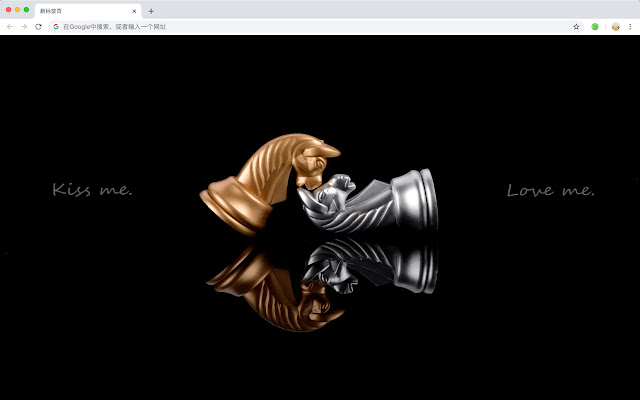


Ladda ner Chess New Tab Page HD Pop Games Theme-förlängningens CRX-fil
Ladda ner Chess New Tab Page HD Pop Games Theme-filändelser i crx-format, installera Chrome-tillägg manuellt i webbläsaren eller dela crx-filerna med vänner för att enkelt installera Chrome-tillägg.
Användarmanual för Tillägg
                        Chess, also known as chess, is a chess game played by two players. The board is square and consists of 64 black and white (dark and light) grids; the pieces are divided into black and white (dark and light) with 32 pieces each, 16 pieces each.

Here's a list of other features you'll get:
 - To-do list
 - Set your favorite wallpapers
 - Discover new hot spots
 - Bookmarks
 - Social network notifications
 - High quality wallpaper for each new label
 - Clock showing date and time
 - Weather widget
 - Open to search
Grundläggande Information om Tillägg
| Namn |  Chess New Tab Page HD Pop Games Theme Chess New Tab Page HD Pop Games Theme |
| ID | hddpafjfkaibcpoingkdjcecibeicanj |
| Officiell webbadress | https://chrome.google.com/webstore/detail/chess-new-tab-page-hd-pop/hddpafjfkaibcpoingkdjcecibeicanj |
| Beskrivning | Each time you open a new tab, you will get a different HD wallpaper for chess. This new theme includes clock and more. |
| Filstorlek | 32.2 KB |
| Antal Installationer | 65 |
| Aktuell Version | 1.1.1.0 |
| Senast Uppdaterad | 2020-05-19 |
| Publiceringsdatum | 2020-05-18 |
| Utvecklare | Invent Wallpaper |
| Betalningssätt | free |
| Stödda Språk | en,zh-CN,zh-TW |
| manifest.json | |
{
    "update_url": "https:\/\/clients2.google.com\/service\/update2\/crx",
    "name": "__MSG_ext_name__",
    "manifest_version": 2,
    "description": "__MSG_ext_desc__",
    "browser_action": {
        "default_icon": {
            "48": "icons\/48.png"
        },
        "default_title": "__MSG_ext_name__"
    },
    "chrome_url_overrides": {
        "newtab": "pages\/newtab\/index.html"
    },
    "background": {
        "scripts": [
            "app.js",
            "pages\/background\/index.js"
        ],
        "persistent": false
    },
    "default_locale": "en",
    "icons": {
        "48": "icons\/48.png",
        "128": "icons\/128.png"
    },
    "minimum_chrome_version": "57",
    "offline_enabled": true,
    "version": "1.1.1.0"
} | |