Simple image resizer
Resize an image to different sizes consecutively.
Vad är Simple image resizer?
Simple image resizer är en Chrome-tillägg utvecklad av Y2NR, och dess huvudfunktion är "Resize an image to different sizes consecutively.".
Tilläggsskärmbilder

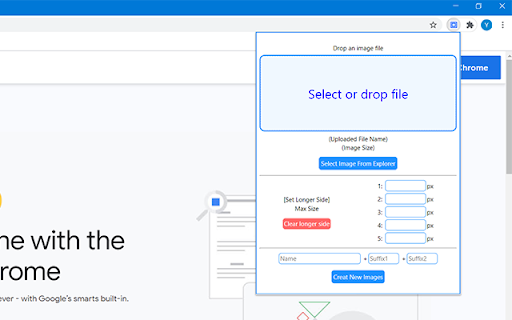
Ladda ner Simple image resizer-förlängningens CRX-fil
Ladda ner Simple image resizer-filändelser i crx-format, installera Chrome-tillägg manuellt i webbläsaren eller dela crx-filerna med vänner för att enkelt installera Chrome-tillägg.
Användarmanual för Tillägg
                        Resize an image file to multiple resolutions with one click.

-Usage
Select of drop a file into the window.
Input longer side sizes.
Click Create New Images.

Jpeg/png files are supported.
Grundläggande Information om Tillägg
| Namn |  Simple image resizer Simple image resizer |
| ID | hmpnebihandoebkjgnmheinclppofppa |
| Officiell webbadress | https://chromewebstore.google.com/detail/simple-image-resizer/hmpnebihandoebkjgnmheinclppofppa |
| Beskrivning | Resize an image to different sizes consecutively. |
| Filstorlek | 14.76 KB |
| Antal Installationer | 179 |
| Aktuell Version | 0.5.0 |
| Senast Uppdaterad | 2020-09-08 |
| Publiceringsdatum | 2020-09-08 |
| Utvecklare | Y2NR |
| E-post | [email protected] |
| Betalningssätt | free |
| Tilläggswebbplats | https://twitter.com/Y2NR1 |
| Stödda Språk | en,ja |
| manifest.json | |
{
    "update_url": "https:\/\/clients2.google.com\/service\/update2\/crx",
    "name": "__MSG_ext_name__",
    "version": "0.5.0",
    "manifest_version": 2,
    "description": "__MSG_ext_desc__",
    "default_locale": "en",
    "permissions": [
        "storage"
    ],
    "background": {
        "scripts": [
            "background.js"
        ],
        "persistent": false
    },
    "icons": {
        "16": "images\/Simple Image Resizer icon_16.png",
        "48": "images\/Simple Image Resizer icon_48.png",
        "128": "images\/Simple Image Resizer icon_128.png"
    },
    "browser_action": {
        "default_icon": "images\/Simple Image Resizer icon_32.png",
        "default_title": "Simple Image Resizer ",
        "default_popup": "popup.html"
    }
} | |