Screenshot Easy
Screenshot Easy - The easiest way to take a customizable screenshot and share to friends
Vad är Screenshot Easy?
Screenshot Easy är en Chrome-tillägg utvecklad av Screenshot Easy, och dess huvudfunktion är "Screenshot Easy - The easiest way to take a customizable screenshot and share to friends".
Tilläggsskärmbilder
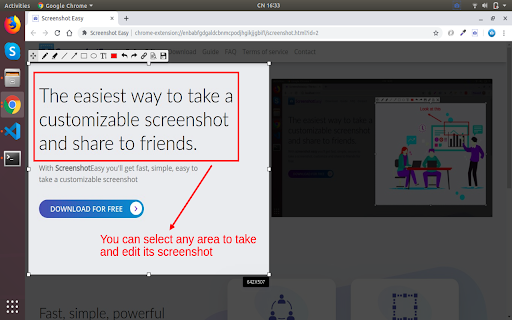
Ladda ner Screenshot Easy-förlängningens CRX-fil
Ladda ner Screenshot Easy-filändelser i crx-format, installera Chrome-tillägg manuellt i webbläsaren eller dela crx-filerna med vänner för att enkelt installera Chrome-tillägg.
Användarmanual för Tillägg
                        - Screenshot Easy is a free tool which allows you taking an editable screenshot in the easy way.
- You'll get fast, simple, easy to take an editable screenshot.
- You can select any area and take its screenshot.
- User-friendly interface makes your work with the tool easier.
- Edit screenshot instantly when taking them.
- You can also upload your screenshot to the server and get its short link right away.
Grundläggande Information om Tillägg
| Namn |  Screenshot Easy Screenshot Easy |
| ID | ikhdemckhflgmlijkaomcpdmljegkakh |
| Officiell webbadress | https://chromewebstore.google.com/detail/screenshot-easy/ikhdemckhflgmlijkaomcpdmljegkakh |
| Beskrivning | Screenshot Easy - The easiest way to take a customizable screenshot and share to friends |
| Filstorlek | 85.2 KB |
| Antal Installationer | 25,953 |
| Aktuell Version | 1.1.4 |
| Senast Uppdaterad | 2023-01-18 |
| Publiceringsdatum | 2020-06-08 |
| Betyg | 4.19/5 Totalt 58 Betyg |
| Utvecklare | Screenshot Easy |
| E-post | [email protected] |
| Betalningssätt | free |
| Stödda Språk | en-US |
| manifest.json | |
{
    "update_url": "https:\/\/clients2.google.com\/service\/update2\/crx",
    "name": "Screenshot Easy",
    "version": "1.1.4",
    "description": "Screenshot Easy - The easiest way to take a customizable screenshot and share to friends",
    "background": {
        "persistent": false,
        "scripts": [
            "background.js"
        ]
    },
    "browser_action": {
        "default_icon": "logo-transparent.png",
        "default_title": "Take a screenshot"
    },
    "permissions": [
        "activeTab"
    ],
    "manifest_version": 2,
    "icons": {
        "16": "icon16.png",
        "32": "icon32.png",
        "48": "icon48.png",
        "64": "icon64.png",
        "128": "icon128.png"
    }
} | |