HTML Style Quick Viewer
HTML DOM element style quick viewer
Vad är HTML Style Quick Viewer?
HTML Style Quick Viewer är en Chrome-tillägg utvecklad av _(:з」∠)_, och dess huvudfunktion är "HTML DOM element style quick viewer".
Tilläggsskärmbilder
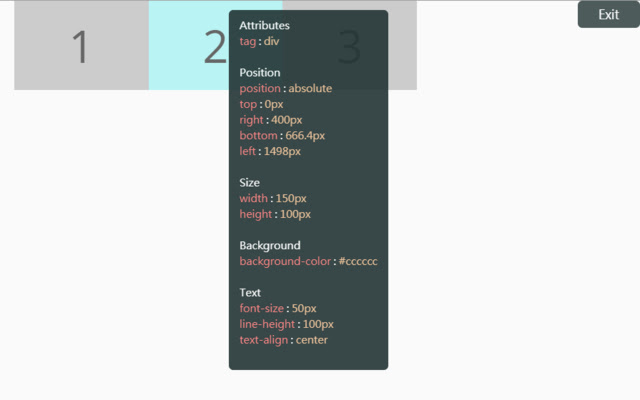
Ladda ner HTML Style Quick Viewer-förlängningens CRX-fil
Ladda ner HTML Style Quick Viewer-filändelser i crx-format, installera Chrome-tillägg manuellt i webbläsaren eller dela crx-filerna med vänner för att enkelt installera Chrome-tillägg.
Användarmanual för Tillägg
                        How about viewing the HTML DOM styles in a different way?
Just move your mouse and it shows the target's styles.

After installation, you may have to reload tabs to for the extension to take effect.

Instructions:
1. Click HTML Style Quick Viewer in the toolbar, then click 'run' button to start.
2. Move mouse to see the element's styles.
3. Mouse left click to close the popup panel.
4. Mouse middle click to pin the popup panel.
5. Click the 'Exit' button at the top-right or click 'Stop' button through the toolbar to stop.
Grundläggande Information om Tillägg
| Namn |  HTML Style Quick Viewer HTML Style Quick Viewer |
| ID | inafmkpmbkldliccdbeieeafnbkcmmap |
| Officiell webbadress | https://chrome.google.com/webstore/detail/html-style-quick-viewer/inafmkpmbkldliccdbeieeafnbkcmmap |
| Beskrivning | HTML DOM element style quick viewer |
| Filstorlek | 15.88 KB |
| Antal Installationer | 271 |
| Aktuell Version | 1.0.2 |
| Senast Uppdaterad | 2018-08-26 |
| Publiceringsdatum | 2018-08-26 |
| Betyg | 5.00/5 Totalt 3 Betyg |
| Utvecklare | _(:з」∠)_ |
| E-post | [email protected] |
| Betalningssätt | free |
| Stödda Språk | en |
| manifest.json | |
{
    "update_url": "https:\/\/clients2.google.com\/service\/update2\/crx",
    "name": "HTML Style Quick Viewer",
    "description": "HTML DOM element style quick viewer",
    "version": "1.0.2",
    "permissions": [
        "activeTab"
    ],
    "content_scripts": [
        {
            "matches": [
                "http:\/\/*\/*",
                "https:\/\/*\/*"
            ],
            "js": [
                "content\/content.js"
            ],
            "css": [
                "content\/content.css"
            ],
            "run_at": "document_start"
        }
    ],
    "browser_action": {
        "default_title": "HTML Style Quick Viewer\nRight click (Close)\nMiddle click (Pin)",
        "default_icon": {
            "16": "icons\/icon_16.png",
            "32": "icons\/icon_32.png",
            "48": "icons\/icon_48.png",
            "128": "icons\/icon_128.png"
        },
        "default_popup": "popup\/popup.html"
    },
    "manifest_version": 2
} | |