Image Pin
Chrome Extension to place a sticky image in an active tab
Vad är Image Pin?
Image Pin är en Chrome-tillägg utvecklad av marius.valasevicius, och dess huvudfunktion är "Chrome Extension to place a sticky image in an active tab".
Tilläggsskärmbilder
Ladda ner Image Pin-förlängningens CRX-fil
Ladda ner Image Pin-filändelser i crx-format, installera Chrome-tillägg manuellt i webbläsaren eller dela crx-filerna med vänner för att enkelt installera Chrome-tillägg.
Användarmanual för Tillägg
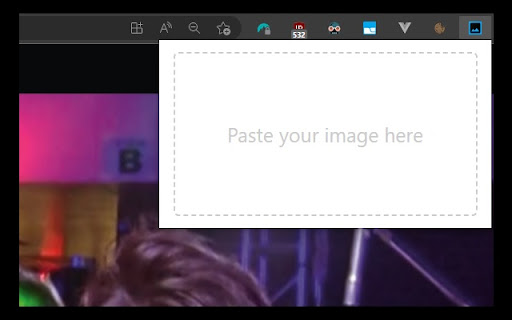
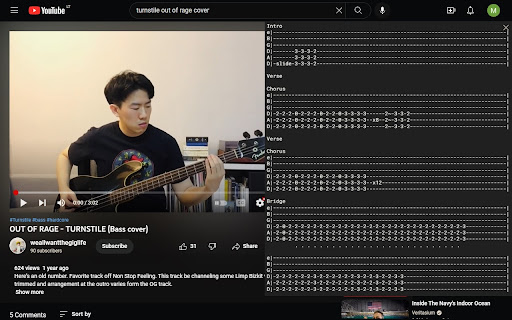
                        Image Pin allows you to place images over the website you're currently browsing. You can drag, resize and clear the image.

How to use:
- make a screenshot using in-build application in your Operating System or copy and image
- click on Image Pin browser extension icon
- paste your image (Ctrl + V on Windows, Command + V on Mac)

Feature set is currently limited, contact me if you find this useful and would like to see more features. Cheers!
Grundläggande Information om Tillägg
| Namn |  Image Pin Image Pin |
| ID | iopfomafdcjjcnoemjbdfckcmlfnbnlo |
| Officiell webbadress | https://chromewebstore.google.com/detail/image-pin/iopfomafdcjjcnoemjbdfckcmlfnbnlo |
| Beskrivning | Chrome Extension to place a sticky image in an active tab |
| Filstorlek | 53.82 KB |
| Antal Installationer | 78 |
| Aktuell Version | 1.0 |
| Senast Uppdaterad | 2022-12-11 |
| Publiceringsdatum | 2022-12-08 |
| Betyg | 3.00/5 Totalt 2 Betyg |
| Utvecklare | marius.valasevicius |
| E-post | [email protected] |
| Betalningssätt | free |
| Stödda Språk | en |
| manifest.json | |
{
    "update_url": "https:\/\/clients2.google.com\/service\/update2\/crx",
    "name": "Image Pin",
    "description": "Chrome Extension to place a sticky image in an active tab",
    "version": "1.0",
    "manifest_version": 3,
    "icons": {
        "128": "src\/assets\/icons\/128.png"
    },
    "content_scripts": [
        {
            "js": [
                "assets\/index.ts-loader.292b987b.js"
            ],
            "matches": [
                "https:\/\/*\/*"
            ],
            "css": [
                "assets\/index.de53758e.css"
            ]
        }
    ],
    "background": {
        "service_worker": "service-worker-loader.js",
        "type": "module"
    },
    "options_ui": {
        "page": "src\/options\/options.html",
        "open_in_tab": false
    },
    "action": {
        "default_popup": "src\/popup\/popup.html",
        "default_icon": {
            "128": "src\/assets\/icons\/128.png"
        }
    },
    "permissions": [
        "storage"
    ],
    "web_accessible_resources": [
        {
            "matches": [
                "https:\/\/*\/*"
            ],
            "resources": [
                "assets\/index.3360b234.js",
                "assets\/storage.8af25ec0.js",
                "assets\/index.ts.39512495.js"
            ],
            "use_dynamic_url": true
        }
    ]
} | |