imoin
Monitor your icinga or nagios instance.
Vad är imoin?
imoin är en Chrome-tillägg utvecklad av https://ewus.de, och dess huvudfunktion är "Monitor your icinga or nagios instance.".
Tilläggsskärmbilder
Ladda ner imoin-förlängningens CRX-fil
Ladda ner imoin-filändelser i crx-format, installera Chrome-tillägg manuellt i webbläsaren eller dela crx-filerna med vänner för att enkelt installera Chrome-tillägg.
Användarmanual för Tillägg
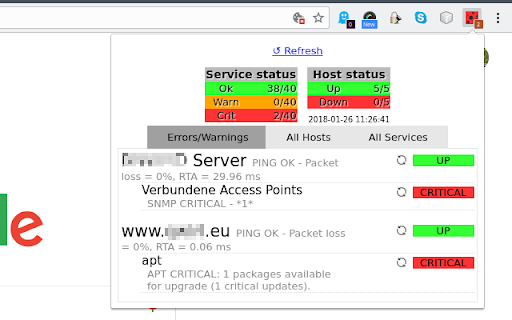
                        See the status of your Icinga or Nagios instance at a glance in your browser.

This add-on needs an Icinga or Nagios server to query. Multiple servers are supported.
A nice toolbar icon summarizes the state of all monitored hosts and services.

Clicking the icon opens a panel with details for errors and warnings, all hosts and all services.
Grundläggande Information om Tillägg
| Namn | |
| ID | ipahifophldbejeoheadbfhdcaemidob |
| Officiell webbadress | https://chromewebstore.google.com/detail/imoin/ipahifophldbejeoheadbfhdcaemidob |
| Beskrivning | Monitor your icinga or nagios instance. |
| Filstorlek | 92.78 KB |
| Antal Installationer | 496 |
| Aktuell Version | 24.0.0 |
| Senast Uppdaterad | 2018-08-29 |
| Publiceringsdatum | 2018-08-29 |
| Utvecklare | https://ewus.de |
| Betalningssätt | free |
| Tilläggswebbplats | https://github.com/ErikWegner/imoin |
| Hjälpsida URL | https://github.com/ErikWegner/imoin/issues |
| Stödda Språk | en |
| manifest.json | |
{
    "update_url": "https:\/\/clients2.google.com\/service\/update2\/crx",
    "manifest_version": 2,
    "name": "imoin",
    "version": "24.0.0",
    "description": "Monitor your icinga or nagios instance.",
    "author": "Erik Wegner",
    "homepage_url": "https:\/\/imoin.qwirl.eu\/",
    "icons": {
        "48": "icons\/icon-48.png"
    },
    "background": {
        "scripts": [
            "bundle.js"
        ]
    },
    "browser_action": {
        "browser_style": false,
        "default_popup": "html\/panel.html",
        "default_title": "imoin",
        "default_icon": {
            "16": "icons\/icon-16.png",
            "32": "icons\/icon-32.png"
        }
    },
    "options_ui": {
        "page": "html\/options.html",
        "open_in_tab": true
    },
    "permissions": [
        "alarms",
        "storage",
        "https:\/\/*\/",
        "http:\/\/*\/"
    ]
} | |