GitHub Custom Tab Size
Make tab indented code more readable by allowing you to set a custom tab size
Vad är GitHub Custom Tab Size?
GitHub Custom Tab Size är en Chrome-tillägg utvecklad av lukechilds, och dess huvudfunktion är "Make tab indented code more readable by allowing you to set a custom tab size".
Tilläggsskärmbilder
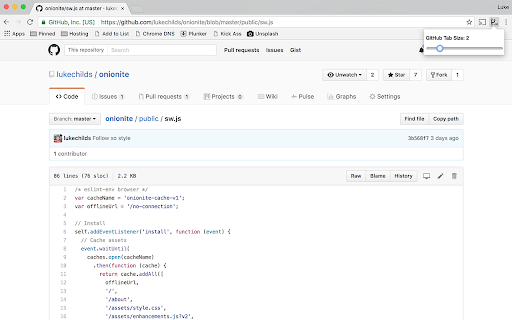
Ladda ner GitHub Custom Tab Size-förlängningens CRX-fil
Ladda ner GitHub Custom Tab Size-filändelser i crx-format, installera Chrome-tillägg manuellt i webbläsaren eller dela crx-filerna med vänner för att enkelt installera Chrome-tillägg.
Användarmanual för Tillägg
Set custom tab size for code view on GitHub.com. The tab size setting is synced across all Chrome browsers you're logged into. Grundläggande Information om Tillägg
| Namn |  GitHub Custom Tab Size GitHub Custom Tab Size |
| ID | jcjfkmdkcaopkioccnpbhiemfcmpnghe |
| Officiell webbadress | https://chromewebstore.google.com/detail/github-custom-tab-size/jcjfkmdkcaopkioccnpbhiemfcmpnghe |
| Beskrivning | Make tab indented code more readable by allowing you to set a custom tab size |
| Filstorlek | 22.35 KB |
| Antal Installationer | 557 |
| Aktuell Version | 1.1.0 |
| Senast Uppdaterad | 2019-05-06 |
| Publiceringsdatum | 2019-05-06 |
| Betyg | 4.30/5 Totalt 10 Betyg |
| Utvecklare | lukechilds |
| E-post | [email protected] |
| Betalningssätt | free |
| Tilläggswebbplats | https://github.com/lukechilds/github-custom-tab-size |
| Stödda Språk | en-US |
| manifest.json | |
{
    "update_url": "https:\/\/clients2.google.com\/service\/update2\/crx",
    "name": "GitHub Custom Tab Size",
    "version": "1.1.0",
    "icons": {
        "256": "icon.png"
    },
    "description": "Make tab indented code more readable by allowing you to set a custom tab size",
    "homepage_url": "https:\/\/github.com\/lukechilds\/github-custom-tab-size",
    "manifest_version": 2,
    "minimum_chrome_version": "36",
    "browser_action": {
        "default_popup": "src\/popup.html"
    },
    "permissions": [
        "storage"
    ],
    "content_scripts": [
        {
            "run_at": "document_start",
            "matches": [
                "https:\/\/github.com\/*\/*",
                "https:\/\/gist.github.com\/*\/*"
            ],
            "js": [
                "src\/content.js"
            ]
        }
    ]
} | |