YouTube Music Mode
Automatically reduces video quality when you are not watching video. Thus, saving your internet bandwidth.
Vad är YouTube Music Mode?
YouTube Music Mode är en Chrome-tillägg utvecklad av http://www.ameyanaik.com, och dess huvudfunktion är "Automatically reduces video quality when you are not watching video. Thus, saving your internet bandwidth.".
Tilläggsskärmbilder
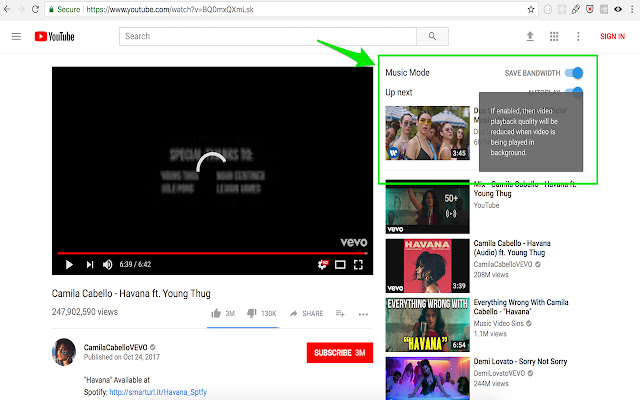


Ladda ner YouTube Music Mode-förlängningens CRX-fil
Ladda ner YouTube Music Mode-filändelser i crx-format, installera Chrome-tillägg manuellt i webbläsaren eller dela crx-filerna med vänner för att enkelt installera Chrome-tillägg.
Användarmanual för Tillägg
                        How to use it?
1) Install 'YouTube Music Mode'
2) When you watch a video, click 'Music Mode' button to enable or disable.

Note: This product is not endorsed, certified or otherwise approved in any way by Youtube or any of its affiliates.

Updates:
v 2.1.0 (2018-07-24)
- (Bug Fix) Reduce/restore Youtube playback quality
- Set 'Youtube Music Mode' enabled by default
Grundläggande Information om Tillägg
| Namn |  YouTube Music Mode YouTube Music Mode |
| ID | jilljhdedkalicogkbdpjaaelofihagl |
| Officiell webbadress | https://chrome.google.com/webstore/detail/youtube-music-mode/jilljhdedkalicogkbdpjaaelofihagl |
| Beskrivning | Automatically reduces video quality when you are not watching video. Thus, saving your internet bandwidth. |
| Filstorlek | 150 KB |
| Antal Installationer | 799 |
| Aktuell Version | 2.1.0 |
| Senast Uppdaterad | 2018-07-24 |
| Publiceringsdatum | 2018-07-24 |
| Betyg | 4.00/5 Totalt 20 Betyg |
| Utvecklare | http://www.ameyanaik.com |
| Betalningssätt | free |
| Stödda Språk | en |
| manifest.json | |
{
    "background": {
        "page": "background.html"
    },
    "content_scripts": [
        {
            "css": [
                "inject_style.css"
            ],
            "js": [
                "v2\/injector.js"
            ],
            "matches": [
                "*:\/\/*.youtube.com\/*"
            ],
            "run_at": "document_idle"
        }
    ],
    "content_security_policy": "script-src 'self' https:\/\/ssl.google-analytics.com https:\/\/cdn.mxpnl.com https:\/\/apis.google.com https:\/\/www.youtube.com\/ https:\/\/s.ytimg.com\/yt\/jsbin\/www-widgetapi-vfl9Ni0ki.js; object-src 'self'",
    "default_locale": "en",
    "description": "__MSG_description__",
    "externally_connectable": {
        "matches": [
            "*:\/\/*.youtube.com\/*"
        ]
    },
    "icons": {
        "128": "icon.png",
        "256": "icon.png",
        "48": "icon.png"
    },
    "manifest_version": 2,
    "minimum_chrome_version": "18",
    "name": "__MSG_name__",
    "permissions": [
        "storage"
    ],
    "update_url": "https:\/\/clients2.google.com\/service\/update2\/crx",
    "version": "2.1.0",
    "web_accessible_resources": [
        "v2\/injected.js",
        "v2\/jquery-3.2.1-min.js"
    ]
} | |