XLang Web Agent
A Chrome extension that navigates websites automatically to fulfill input instructions.
Vad är XLang Web Agent?
XLang Web Agent är en Chrome-tillägg utvecklad av xlang-webot, och dess huvudfunktion är "A Chrome extension that navigates websites automatically to fulfill input instructions.".
Tilläggsskärmbilder
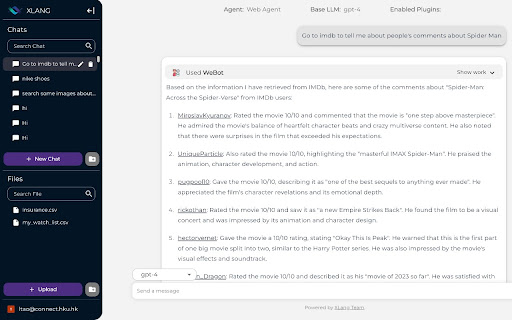

Ladda ner XLang Web Agent-förlängningens CRX-fil
Ladda ner XLang Web Agent-filändelser i crx-format, installera Chrome-tillägg manuellt i webbläsaren eller dela crx-filerna med vänner för att enkelt installera Chrome-tillägg.
Användarmanual för Tillägg
This extension is XLang Web Agent which can navigate websites automatically to fulfill input instructions. It can interact with XLang Chat interface and execute tasks on the web or extract information from websites for users. Grundläggande Information om Tillägg
| Namn |  XLang Web Agent XLang Web Agent |
| ID | kbeepjbbaglgbhjkgnfeapbfofogblhb |
| Officiell webbadress | https://chromewebstore.google.com/detail/xlang-web-agent/kbeepjbbaglgbhjkgnfeapbfofogblhb |
| Beskrivning | A Chrome extension that navigates websites automatically to fulfill input instructions. |
| Filstorlek | 5.18 MB |
| Antal Installationer | 776 |
| Aktuell Version | 1.1.4 |
| Senast Uppdaterad | 2023-08-09 |
| Publiceringsdatum | 2023-07-17 |
| Betyg | 5.00/5 Totalt 1 Betyg |
| Utvecklare | xlang-webot |
| E-post | [email protected] |
| Betalningssätt | free |
| Stödda Språk | en-US |
| manifest.json | |
{
"update_url": "https:\/\/clients2.google.com\/service\/update2\/crx",
"description": "A Chrome extension that navigates websites automatically to fulfill input instructions.",
"version": "1.1.4",
"manifest_version": 3,
"name": "XLang Web Agent",
"options_page": "options.html",
"background": {
"service_worker": "background.bundle.js"
},
"permissions": [
"tabs",
"activeTab",
"storage",
"clipboardWrite",
"debugger",
"management",
"cookies"
],
"host_permissions": [
"*:\/\/localhost\/*",
"*:\/\/chat.xlang.ai\/*"
],
"action": {
"default_popup": "popup.html",
"default_icon": "icon-34.png"
},
"icons": {
"128": "icon-128.png"
},
"content_scripts": [
{
"matches": [
"http:\/\/*\/*",
"https:\/\/*\/*",
" | |