Spotify on Browser
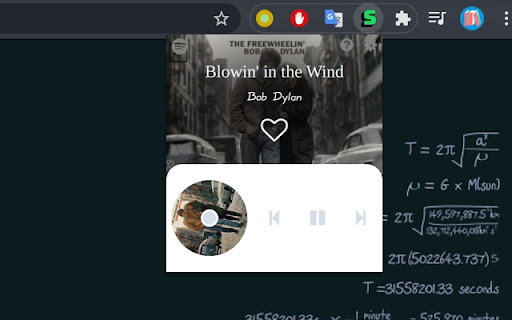
A minimalist Spotify player makes life easier
Vad är Spotify on Browser?
Spotify on Browser är en Chrome-tillägg utvecklad av River, och dess huvudfunktion är "A minimalist Spotify player makes life easier".
Tilläggsskärmbilder

Ladda ner Spotify on Browser-förlängningens CRX-fil
Ladda ner Spotify on Browser-filändelser i crx-format, installera Chrome-tillägg manuellt i webbläsaren eller dela crx-filerna med vänner för att enkelt installera Chrome-tillägg.
Användarmanual för Tillägg
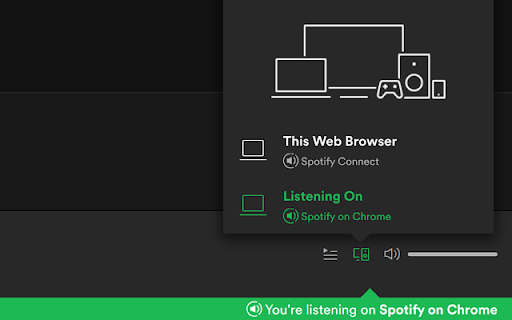
                        Spotify has a really cool feature called Spotify Connect. Basically it could turn anything into a Spotify player, and control it with your cellphone. I made this app trying to connect Spotify with Chrome.(Check it out: Firefox version is released!)

Why use this player instead of Spotify website?

   1. Play in background of Chrome, no need to keep Spotify website open;
   2. Global keyboard shortcut to play/stop/next/previous/like; ("Like" means to save the track into your library.)
   3. Transfer playback to Chrome seamlessly with just one click.

Default keyboard shortcuts
Play previous track:  Ctrl+shift+7
Play or pause:            Ctrl+shift+8
Play next track:          Ctrl+shift+9
Save the track:           Ctrl+shift+0

A small gadget just makes life a little bit easier.

Besides, it's open source!
https://github.com/revir/spotify-on-browser
Read more: https://revir.github.io/2021/01/16/Spotify-on-Chrome/
Feedback can also be here: https://pnlpal.dev/category/3/feedback
Grundläggande Information om Tillägg
| Namn |  Spotify on Browser Spotify on Browser |
| ID | kgniaoeehojejhienanbmikafmogfdfh |
| Officiell webbadress | https://chromewebstore.google.com/detail/spotify-on-browser/kgniaoeehojejhienanbmikafmogfdfh |
| Beskrivning | A minimalist Spotify player makes life easier |
| Filstorlek | 2.47 MB |
| Antal Installationer | 921 |
| Aktuell Version | 0.0.6 |
| Senast Uppdaterad | 2021-06-03 |
| Publiceringsdatum | 2021-01-18 |
| Betyg | 4.40/5 Totalt 5 Betyg |
| Utvecklare | River |
| E-post | [email protected] |
| Betalningssätt | free |
| Tilläggswebbplats | https://github.com/revir/spotify-on-chrome |
| Hjälpsida URL | https://github.com/revir/spotify-on-chrome |
| Stödda Språk | en |
| manifest.json | |
{
    "update_url": "https:\/\/clients2.google.com\/service\/update2\/crx",
    "description": "A minimalist Spotify player makes life easier",
    "version": "0.0.6",
    "manifest_version": 2,
    "name": "Spotify on Browser",
    "permissions": [
        "notifications"
    ],
    "background": {
        "persistent": true,
        "page": "background.html"
    },
    "browser_action": {
        "default_title": "Spotify on Browser",
        "default_popup": "player.html"
    },
    "options_ui": {
        "page": "option.html",
        "open_in_tab": true
    },
    "icons": {
        "32": "images\/32.png",
        "64": "images\/64.png",
        "128": "images\/128.png",
        "256": "images\/256.png"
    },
    "content_scripts": [
        {
            "js": [
                "authorized.bundle.js"
            ],
            "matches": [
                "https:\/\/pnlpal.dev\/spotify-on-browser*"
            ]
        }
    ],
    "web_accessible_resources": [
        "authorized.html"
    ],
    "commands": {
        "toggle-feature-previous": {
            "suggested_key": {
                "default": "Ctrl+Shift+7"
            },
            "global": true,
            "description": "Play previous track"
        },
        "toggle-feature-play": {
            "suggested_key": {
                "default": "Ctrl+Shift+8"
            },
            "global": true,
            "description": "Play or pause"
        },
        "toggle-feature-next": {
            "suggested_key": {
                "default": "Ctrl+Shift+9"
            },
            "global": true,
            "description": "Play next track"
        },
        "toggle-feature-save": {
            "suggested_key": {
                "default": "Ctrl+Shift+0"
            },
            "global": true,
            "description": "Save the track"
        }
    }
} | |