Myles
Compare rewards across various affiliate programs
Vad är Myles?
Myles är en Chrome-tillägg utvecklad av Harsh Gosar, och dess huvudfunktion är "Compare rewards across various affiliate programs".
Tilläggsskärmbilder
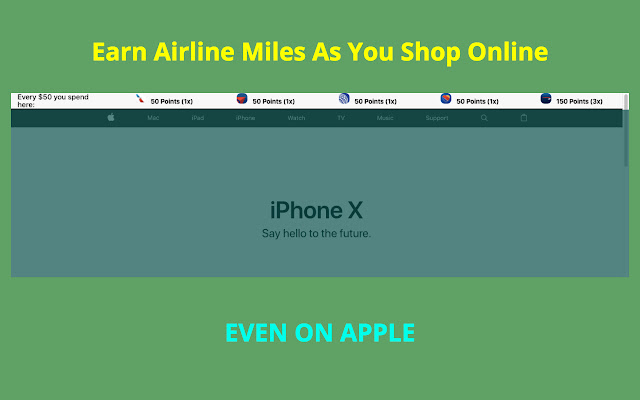

Ladda ner Myles-förlängningens CRX-fil
Ladda ner Myles-filändelser i crx-format, installera Chrome-tillägg manuellt i webbläsaren eller dela crx-filerna med vänner för att enkelt installera Chrome-tillägg.
Användarmanual för Tillägg
                        Compare your rewards earnings for Ebates, American Airlines, Delta Airlines, United Ailrines, Southwest Airlines shopping portal

[Points updated for Feb 2018]

Disclaimer:
1) This chrome extension is not perfect and I don't guarantee the accuracy of the points depicted.
2) I am not liable for any of your shopping decisions and points received.
3) The airline decides their own policy and it's up to you to read that.
4) Points may not be exact and you agree to confirm them yourself.

You agree to these terms by downloading the extension.

Email your suggestions to [email protected] .
Grundläggande Information om Tillägg
| Namn |  Myles Myles |
| ID | knjgohecfkkdfmhknimolilgfcgmephf |
| Officiell webbadress | https://chrome.google.com/webstore/detail/myles/knjgohecfkkdfmhknimolilgfcgmephf |
| Beskrivning | Compare rewards across various affiliate programs |
| Filstorlek | 1.01 MB |
| Antal Installationer | 51 |
| Aktuell Version | 1.0.5 |
| Senast Uppdaterad | 2018-02-27 |
| Publiceringsdatum | 2018-02-27 |
| Betyg | 5.00/5 Totalt 6 Betyg |
| Utvecklare | Harsh Gosar |
| E-post | [email protected] |
| Betalningssätt | free |
| Tilläggswebbplats | http://thatmilesapp.com |
| URL till Sekretesspolicy Sidan | http://gosar.us/privacy.html |
| Stödda Språk | en-US |
| manifest.json | |
{
    "update_url": "https:\/\/clients2.google.com\/service\/update2\/crx",
    "manifest_version": 2,
    "name": "Myles",
    "description": "Compare rewards across various affiliate programs",
    "version": "1.0.5",
    "icons": {
        "16": "icons\/16.png",
        "48": "icons\/64.png",
        "128": "icons\/128.png"
    },
    "background": {
        "persistent": false,
        "scripts": [
            "background\/location.js",
            "background\/main.js"
        ]
    },
    "browser_action": {
        "default_popup": "popup\/popup.html"
    },
    "permissions": [
        "activeTab",
        "identity",
        "tabs",
        "geolocation",
        "storage"
    ],
    "content_scripts": [
        {
            "matches": [
                "http:\/\/www.amazon.com\/",
                "https:\/\/www.amazon.com\/"
            ],
            "css": [
                "lib\/font.css",
                "content\/amazon-home\/style.css"
            ],
            "js": [
                "lib\/jquery.js",
                "lib\/tether.js",
                "lib\/bootstrap.min.js",
                "content\/amazon-home\/script.js"
            ]
        },
        {
            "matches": [
                "http:\/\/*\/*",
                "https:\/\/*\/*"
            ],
            "exclude_globs": [
                "http:\/\/www.amazon.com\/*",
                "https:\/\/www.amazon.com\/*"
            ],
            "css": [
                "lib\/font.css",
                "header\/style.css"
            ],
            "js": [
                "lib\/jquery.js",
                "lib\/tether.js",
                "lib\/bootstrap.min.js",
                "content\/db\/db_us.js",
                "content\/db\/db_in.js",
                "content\/helper\/domain_extract.js",
                "content\/header\/header_us.js",
                "content\/header\/header_in.js",
                "content\/script.js"
            ]
        },
        {
            "matches": [
                "https:\/\/shop.jetprivilege.com\/",
                "http:\/\/shop.jetprivilege.com\/"
            ],
            "css": [],
            "js": [
                "lib\/jquery.js",
                "content\/jet\/script.js"
            ]
        }
    ],
    "content_security_policy": "script-src 'self' https:\/\/ssl.google-analytics.com; object-src 'self'"
} | |