Hide Twitter Trends
Hide Twitter (What’s happening, Who to follow, Topics to follow) elements
Vad är Hide Twitter Trends?
Hide Twitter Trends är en Chrome-tillägg utvecklad av http://moath.dev, och dess huvudfunktion är "Hide Twitter (What’s happening, Who to follow, Topics to follow) elements".
Tilläggsskärmbilder

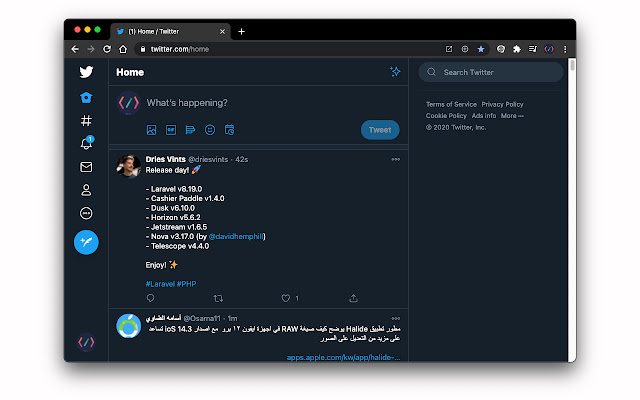
Ladda ner Hide Twitter Trends-förlängningens CRX-fil
Ladda ner Hide Twitter Trends-filändelser i crx-format, installera Chrome-tillägg manuellt i webbläsaren eller dela crx-filerna med vänner för att enkelt installera Chrome-tillägg.
Användarmanual för Tillägg
If you don't like the Twitter `What’s happening`, `Who to follow`, and `Topics to follow` tabs, and you want to hide it this extension is your solution, this extension will hide Twitter `What’s happening`, `Who to follow`, and `Topics to follow` tabs from Twitter web app and let you focus on your timeline. Grundläggande Information om Tillägg
| Namn |  Hide Twitter Trends Hide Twitter Trends |
| ID | lapmncfnibdclongbkleadoicnkhknia |
| Officiell webbadress | https://chrome.google.com/webstore/detail/hide-twitter-trends/lapmncfnibdclongbkleadoicnkhknia |
| Beskrivning | Hide Twitter (What’s happening, Who to follow, Topics to follow) elements |
| Filstorlek | 511 KB |
| Antal Installationer | 14,957 |
| Aktuell Version | 0.10.2 |
| Senast Uppdaterad | 2022-06-28 |
| Publiceringsdatum | 2020-07-19 |
| Betyg | 4.46/5 Totalt 90 Betyg |
| Utvecklare | http://moath.dev |
| E-post | [email protected] |
| Betalningssätt | free |
| Tilläggswebbplats | https://github.com/DevMoath/hide-twitter-trends |
| Hjälpsida URL | https://github.com/DevMoath/hide-twitter-trends/issues |
| Stödda Språk | en |
| manifest.json | |
{
    "update_url": "https:\/\/clients2.google.com\/service\/update2\/crx",
    "manifest_version": 3,
    "name": "Hide Twitter Trends",
    "version": "0.10.2",
    "description": "Hide Twitter (What\u2019s happening, Who to follow, Topics to follow) elements",
    "author": "Moath Alhajri",
    "homepage_url": "https:\/\/moath.dev\/",
    "icons": {
        "16": "img\/icon_16.png",
        "32": "img\/icon_32.png",
        "48": "img\/icon_48.png",
        "128": "img\/icon_128.png"
    },
    "content_scripts": [
        {
            "css": [
                "style.css"
            ],
            "matches": [
                "*:\/\/*.twitter.com\/*"
            ]
        }
    ]
} | |