PDF Bookmarker
Bookmark PDF pages for easy access
Vad är PDF Bookmarker?
PDF Bookmarker är en Chrome-tillägg utvecklad av Michael Truong, och dess huvudfunktion är "Bookmark PDF pages for easy access".
Tilläggsskärmbilder
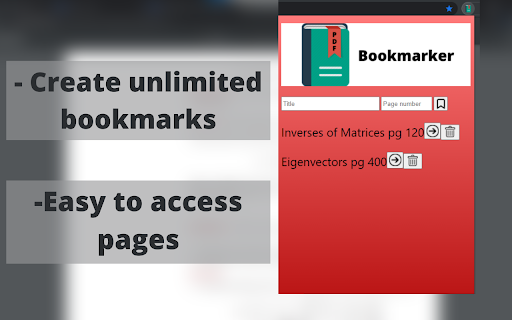
Ladda ner PDF Bookmarker-förlängningens CRX-fil
Ladda ner PDF Bookmarker-filändelser i crx-format, installera Chrome-tillägg manuellt i webbläsaren eller dela crx-filerna med vänner för att enkelt installera Chrome-tillägg.
Användarmanual för Tillägg
                        Read PDFs efficiently with PDF Bookmarker.

Have you ever used a PDF version of a textbook and hated manually switching back and forth between pages? PDF Bookmarker solves this problem by allowing users to title and bookmark specific pages in the PDF.

Using PDF Bookmarker:
- simply enter in the page number and title of what you want to call the bookmark
(title optional) and it will save onto the extension for easy access
-click the bookmark button to bookmark your desired page
- click the arrow button to access the page, and the delete button to delete the bookmark

Created by Michael Truong
Grundläggande Information om Tillägg
| Namn |  PDF Bookmarker PDF Bookmarker |
| ID | lcjfmnolgglggffdhkpfgiobobfmbhbd |
| Officiell webbadress | https://chromewebstore.google.com/detail/pdf-bookmarker/lcjfmnolgglggffdhkpfgiobobfmbhbd |
| Beskrivning | Bookmark PDF pages for easy access |
| Filstorlek | 141 KB |
| Antal Installationer | 666 |
| Aktuell Version | 2.0.1 |
| Senast Uppdaterad | 2022-01-23 |
| Publiceringsdatum | 2021-06-24 |
| Betyg | 3.50/5 Totalt 4 Betyg |
| Utvecklare | Michael Truong |
| E-post | [email protected] |
| Betalningssätt | free |
| Stödda Språk | en-US |
| manifest.json | |
{
    "update_url": "https:\/\/clients2.google.com\/service\/update2\/crx",
    "name": "PDF Bookmarker",
    "description": "Bookmark PDF pages for easy access",
    "version": "2.0.1",
    "manifest_version": 3,
    "background": {
        "service_worker": "background.js"
    },
    "permissions": [
        "storage",
        "tabs"
    ],
    "action": {
        "default_popup": "popup.html",
        "default_icon": {
            "16": "\/images\/PDF16.png",
            "32": "\/images\/PDF32.png",
            "48": "\/images\/PDF48.png",
            "128": "\/images\/PDF128.png"
        }
    },
    "icons": {
        "16": "\/images\/PDF16.png",
        "32": "\/images\/PDF32.png",
        "48": "\/images\/PDF48.png",
        "128": "\/images\/PDF128.png"
    }
} | |