Journal access through HKU library
A simple chrome extension that let you access journal through HKU library resources (HKU ID needed).
Vad är Journal access through HKU library?
Journal access through HKU library är en Chrome-tillägg utvecklad av junyichen, och dess huvudfunktion är "A simple chrome extension that let you access journal through HKU library resources (HKU ID needed).".
Tilläggsskärmbilder


Ladda ner Journal access through HKU library-förlängningens CRX-fil
Ladda ner Journal access through HKU library-filändelser i crx-format, installera Chrome-tillägg manuellt i webbläsaren eller dela crx-filerna med vänner för att enkelt installera Chrome-tillägg.
Användarmanual för Tillägg
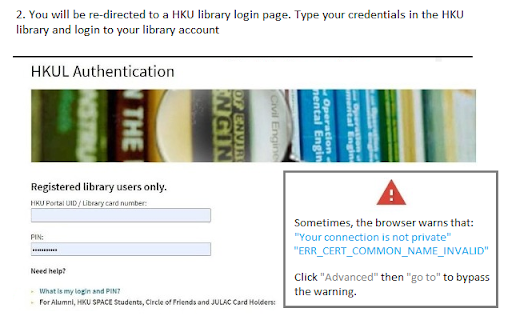
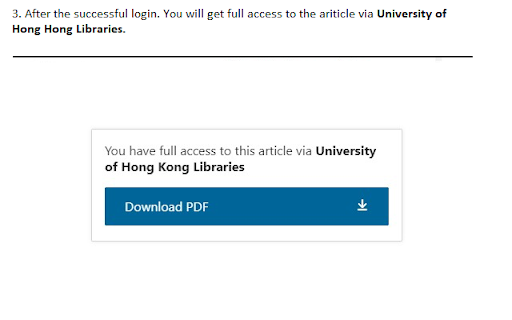
An extension that redirect you from the journal page to the HKU library portal. You need to login the HKU library. The extension will automatically parse the current URL of the current paper page to the HKU library address. Grundläggande Information om Tillägg
| Namn |  Journal access through HKU library Journal access through HKU library |
| ID | lcnnijjgcjfpcfjgnahbcpapbmkiceld |
| Officiell webbadress | https://chromewebstore.google.com/detail/journal-access-through-hk/lcnnijjgcjfpcfjgnahbcpapbmkiceld |
| Beskrivning | A simple chrome extension that let you access journal through HKU library resources (HKU ID needed). |
| Filstorlek | 47.64 KB |
| Antal Installationer | 135 |
| Aktuell Version | 0.0.1 |
| Senast Uppdaterad | 2021-09-02 |
| Publiceringsdatum | 2021-08-04 |
| Utvecklare | junyichen |
| E-post | [email protected] |
| Betalningssätt | free |
| Stödda Språk | en-US |
| manifest.json | |
{
    "update_url": "https:\/\/clients2.google.com\/service\/update2\/crx",
    "manifest_version": 2,
    "name": "Journal access through HKU library",
    "short_name": "HKULibJ",
    "description": "A simple chrome extension that let you access journal through HKU library resources (HKU ID needed).",
    "version": "0.0.1",
    "minimum_chrome_version": "38",
    "permissions": [
        "contextMenus",
        "tabs"
    ],
    "icons": {
        "16": "assets\/icon16.png",
        "128": "assets\/icon128.png"
    },
    "background": {
        "page": "background.html"
    }
} | |