Auto Refresh Page
Refresh web pages automatically. Auto-refresh and page monitor with specified time intervals.
Vad är Auto Refresh Page?
Auto Refresh Page är en Chrome-tillägg utvecklad av Auto Refresh Page, och dess huvudfunktion är "Refresh web pages automatically. Auto-refresh and page monitor with specified time intervals.".
Tilläggsskärmbilder


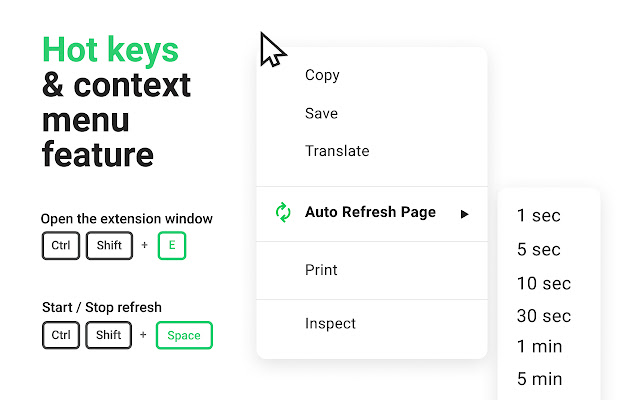


Ladda ner Auto Refresh Page-förlängningens CRX-fil
Ladda ner Auto Refresh Page-filändelser i crx-format, installera Chrome-tillägg manuellt i webbläsaren eller dela crx-filerna med vänner för att enkelt installera Chrome-tillägg.
Användarmanual för Tillägg
                        Auto Refresh Page is a browser extension that automatically refreshes and reloads any page or tab after a specified number of seconds. Just enter the number of seconds between page refreshes and click the "Start" button.

The extension is useful to all users who need to automatically refresh browser pages or tabs according to the selected parameters:

- Automatically refresh pages at a specified time interval
- Automatically refresh pages with a random (random) time interval
- Automatically refresh pages at a specified time (09:00, 18:20, 9:30pm, etc.)
- Automatically refresh all open browser tabs
- Automatically update URLs from the list
- Automatically refresh common domain name pages
- Search for keywords or regular expressions on automatic page refresh
- Auto-clicking buttons or links when auto-refreshing pages

The extension is easy to use:

1) enter the desired number of seconds or select the ready-made time presets and press the "Start" button;

2) to stop updating the page - click the "Stop" button;

3) if you want to select more options, click on the "Advanced options" dropdown list and select the options that interest you and click on the "Start" button;

Advanced options for automatic page refresh:

- Clear cache on every automatic page refresh
- Search for text on automatically updated pages
- Display notifications
- Saving the selected parameters on the page
- Automatic clicking on a button or link on page refresh
- Display of update counter, time of last and next update

Support us on Patreon - https://www.patreon.com/autorefreshpage
Read our blog - https://www.hashtap.com/@refresh
Donate - https://www.paypal.me/AutoRefreshPay
Grundläggande Information om Tillägg
| Namn |  Auto Refresh Page Auto Refresh Page |
| ID | lekdbhmflddpamabeldfbaheinkkaibj |
| Officiell webbadress | https://chrome.google.com/webstore/detail/lekdbhmflddpamabeldfbaheinkkaibj |
| Beskrivning | Refresh web pages automatically. Auto-refresh and page monitor with specified time intervals. |
| Filstorlek | 714 KB |
| Antal Installationer | 63,740 |
| Aktuell Version | 3.2 |
| Senast Uppdaterad | 2023-02-14 |
| Publiceringsdatum | 2022-01-19 |
| Betyg | 4.34/5 Totalt 88 Betyg |
| Utvecklare | Auto Refresh Page |
| E-post | [email protected] |
| Betalningssätt | free |
| Tilläggswebbplats | https://www.hashtap.com/@refresh |
| Hjälpsida URL | https://www.hashtap.com/@refresh |
| Stödda Språk | id,ms,de,en,en-GB,en-US,fil,fr,nl,no,vi,tr,ca,da,et,es,es-419,hr,it,lv,lt,hu,pl,pt-BR,pt-PT,ro,sk,sl,fi,sv,cs,el,sr,bg,ru,uk,mr,hi,bn,gu,ta,te,ml,th,zh-CN,zh-TW,ja,ko |
| manifest.json | |
{
"update_url": "https:\/\/clients2.google.com\/service\/update2\/crx",
"manifest_version": 3,
"name": "__MSG_app_name__",
"description": "__MSG_app_description__",
"short_name": "__MSG_app_short_name__",
"version": "3.2",
"default_locale": "en",
"author": "Auto Refresh Page",
"homepage_url": "https:\/\/www.hashtap.com\/@refresh",
"icons": {
"16": "\/img\/icons\/16x16.png",
"32": "\/img\/icons\/32x32.png",
"48": "\/img\/icons\/48x48.png",
"64": "\/img\/icons\/64x64.png",
"80": "\/img\/icons\/80x80.png",
"128": "\/img\/icons\/128x128.png"
},
"commands": {
"_execute_browser_action": {
"suggested_key": {
"default": "Ctrl+Shift+E",
"mac": "Command+Shift+E"
}
},
"toggle": {
"description": "__MSG_command_toggle__",
"suggested_key": {
"default": "Ctrl+Shift+Space",
"mac": "Command+Shift+Space"
}
}
},
"action": {
"default_icon": {
"16": "\/img\/icons\/16x16-green.png",
"20": "\/img\/icons\/20x20-green.png",
"24": "\/img\/icons\/24x24-green.png",
"32": "\/img\/icons\/32x32-green.png"
},
"default_title": "__MSG_app_short_name__",
"default_popup": "html\/popup.html"
},
"content_scripts": [
{
"matches": [
" | |