YouTube video length
Shows video length next to YouTube video links
Vad är YouTube video length?
YouTube video length är en Chrome-tillägg utvecklad av Brian, och dess huvudfunktion är "Shows video length next to YouTube video links".
Tilläggsskärmbilder

Ladda ner YouTube video length-förlängningens CRX-fil
Ladda ner YouTube video length-filändelser i crx-format, installera Chrome-tillägg manuellt i webbläsaren eller dela crx-filerna med vänner för att enkelt installera Chrome-tillägg.
Användarmanual för Tillägg
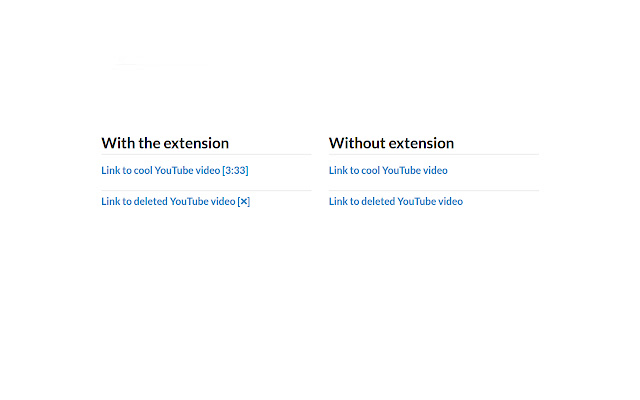
                        Shows video duration next to YouTube links. For example "Cool video [2:30]".

Also a tooltip showing additional video information appears when your mouse hovers over a YouTube link showing.


More information:
 - Shows when a video is unavailable - [❌]
 - Shows when a video is blocked in your region - [❌ country blocked]
 - Shows when a video is age restricted - [18+]
 - Works on text and image links
 - Accounts for videos with an offset. A 2 minute video with a 1 minute offset is shown as having a 1 minute duration.

If you have any issues please leave a comment here or log them on Github.

Code available on Github: https://github.com/Brian-Gaffney/YouTube-video-length-Chrome-extension
Grundläggande Information om Tillägg
| Namn |  YouTube video length YouTube video length |
| ID | lfkbfhglojdeoebdkpmgmphplhanchff |
| Officiell webbadress | https://chrome.google.com/webstore/detail/youtube-video-length/lfkbfhglojdeoebdkpmgmphplhanchff |
| Beskrivning | Shows video length next to YouTube video links |
| Filstorlek | 120 KB |
| Antal Installationer | 482 |
| Aktuell Version | 2.1.1 |
| Senast Uppdaterad | 2017-07-30 |
| Publiceringsdatum | 2017-07-30 |
| Betyg | 4.20/5 Totalt 10 Betyg |
| Utvecklare | Brian |
| Betalningssätt | free |
| Tilläggswebbplats | https://github.com/Brian-Gaffney/YouTube-video-length-Chrome-extension |
| Stödda Språk | en-US |
| manifest.json | |
{
"update_url": "https:\/\/clients2.google.com\/service\/update2\/crx",
"manifest_version": 2,
"name": "YouTube video length",
"description": "Shows video length next to YouTube video links",
"version": "2.1.1",
"permissions": [
"https:\/\/api.youtube.com\/"
],
"background": {
"scripts": [
"background.js"
],
"persistent": false
},
"icons": {
"48": "48.png",
"128": "128.png"
},
"browser_action": {
"default_title": "Shows video length next to YouTube video links",
"default_icon": {
"19": "icon.png"
}
},
"content_scripts": [
{
"matches": [
" | |