MUSE login
Automatically log in to shef.ac.uk without typing your details!
Vad är MUSE login?
MUSE login är en Chrome-tillägg utvecklad av georgepowell10, och dess huvudfunktion är "Automatically log in to shef.ac.uk without typing your details!".
Tilläggsskärmbilder
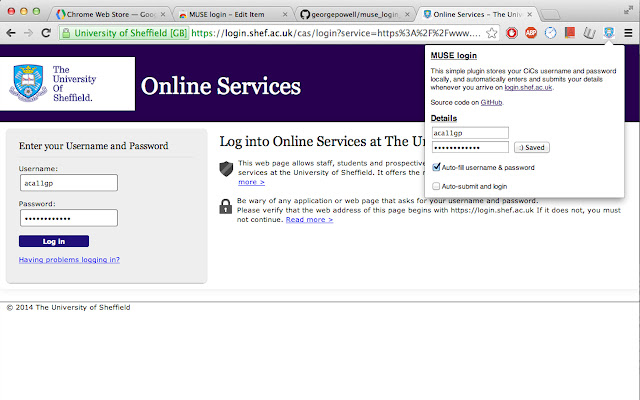
Ladda ner MUSE login-förlängningens CRX-fil
Ladda ner MUSE login-filändelser i crx-format, installera Chrome-tillägg manuellt i webbläsaren eller dela crx-filerna med vänner för att enkelt installera Chrome-tillägg.
Användarmanual för Tillägg
                        Fed up of typing your MUSE login every single freaking time? Why can't chrome remember your password or keep you signed in like every other website? Now it can! Introducing the MUSE login chrome extension. The extension automatically fills in and submits the login form whenever you arrive on the university login page, so you don't have to!

Fully open source and free forever at https://github.com/georgepowell/muse_login_chrome

Extension does not access the internet and stores your details safely on the local machine. Feel free to check out the source code if you have any doubts.
Grundläggande Information om Tillägg
| Namn |  MUSE login MUSE login |
| ID | lgemcjddblhggnfeigkgoefcedkhmdnl |
| Officiell webbadress | https://chrome.google.com/webstore/detail/muse-login/lgemcjddblhggnfeigkgoefcedkhmdnl |
| Beskrivning | Automatically log in to shef.ac.uk without typing your details! |
| Filstorlek | 211 KB |
| Antal Installationer | 31 |
| Aktuell Version | 0.1 |
| Senast Uppdaterad | 2014-03-03 |
| Publiceringsdatum | 2014-03-03 |
| Betyg | 5.00/5 Totalt 1 Betyg |
| Utvecklare | georgepowell10 |
| Betalningssätt | free |
| Stödda Språk | en-GB |
| manifest.json | |
{
    "update_url": "https:\/\/clients2.google.com\/service\/update2\/crx",
    "name": "MUSE login",
    "version": "0.1",
    "description": "Automatically log in to shef.ac.uk without typing your details!",
    "content_scripts": [
        {
            "js": [
                "jquery.js",
                "content_script.js"
            ],
            "matches": [
                "http:\/\/login.shef.ac.uk\/*",
                "https:\/\/login.shef.ac.uk\/*"
            ]
        }
    ],
    "permissions": [
        "declarativeContent",
        "storage"
    ],
    "icons": {
        "19": "icon-19.png",
        "48": "icon-48.png",
        "128": "icon-128.png"
    },
    "browser_action": {
        "default_icon": "icon-19.png",
        "default_title": "Muse Login!",
        "default_popup": "default_page.html"
    },
    "manifest_version": 2
} | |