Exify
EXIF viewer for the modern Web
Vad är Exify?
Exify är en Chrome-tillägg utvecklad av thesilentman, och dess huvudfunktion är "EXIF viewer for the modern Web".
Tilläggsskärmbilder

Ladda ner Exify-förlängningens CRX-fil
Ladda ner Exify-filändelser i crx-format, installera Chrome-tillägg manuellt i webbläsaren eller dela crx-filerna med vänner för att enkelt installera Chrome-tillägg.
Användarmanual för Tillägg
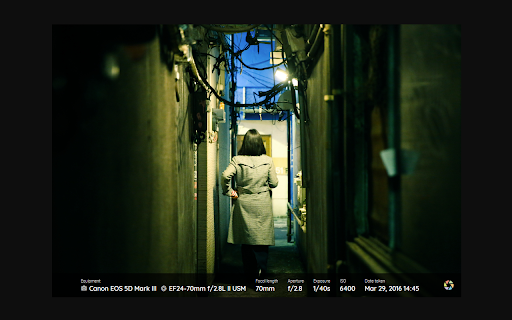
                        Show EXIF info by hovering the mouse over a photo.

Main features:
- Default info: Equipment (Camera + Lens), Focal Length, Aperture, Exposure, ISO
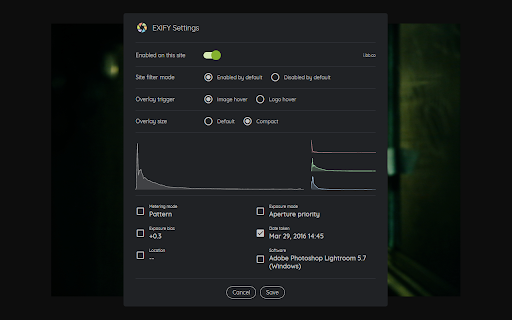
- Optional info: Date Taken, Location (via Google Maps), Metering Mode, Exposure Mode, Exposure Bias, Software
- Histogram (via the settings dialog)

Settings:
- Use compact overlay size
- Toggle the overlay on or off for the current site
- Control whether the overlay should be on or off by default

This add-on is clean of any tracking or ads.
Grundläggande Information om Tillägg
| Namn |  Exify Exify |
| ID | llhmhhnpmiikplpnkmbgbgmlenleecle |
| Officiell webbadress | https://chromewebstore.google.com/detail/exify/llhmhhnpmiikplpnkmbgbgmlenleecle |
| Beskrivning | EXIF viewer for the modern Web |
| Filstorlek | 362 KB |
| Antal Installationer | 2,510 |
| Aktuell Version | 2.0.26 |
| Senast Uppdaterad | 2023-11-22 |
| Publiceringsdatum | 2020-06-08 |
| Betyg | 4.08/5 Totalt 12 Betyg |
| Utvecklare | thesilentman |
| E-post | [email protected] |
| Betalningssätt | free |
| Tilläggswebbplats | https://www.exify.io |
| Hjälpsida URL | https://www.exify.io |
| Stödda Språk | en |
| manifest.json | |
{
    "update_url": "https:\/\/clients2.google.com\/service\/update2\/crx",
    "name": "Exify",
    "version": "2.0.26",
    "description": "EXIF viewer for the modern Web",
    "homepage_url": "https:\/\/www.exify.info\/",
    "icons": {
        "16": "icons\/icon16.png",
        "48": "icons\/icon48.png",
        "128": "icons\/icon128.png"
    },
    "background": {
        "scripts": [
            "background.js"
        ],
        "persistent": false
    },
    "content_scripts": [
        {
            "matches": [
                "*:\/\/*\/*"
            ],
            "js": [
                "content.js"
            ],
            "css": [
                "content.css"
            ]
        }
    ],
    "browser_action": {
        "default_popup": "popup.html",
        "default_icon": {
            "16": "icons\/icon16.png",
            "48": "icons\/icon48.png",
            "128": "icons\/icon128.png"
        }
    },
    "web_accessible_resources": [
        "icons\/*"
    ],
    "permissions": [
        "*:\/\/*\/*",
        "storage",
        "activeTab"
    ],
    "content_security_policy": "script-src 'self'; object-src 'self'",
    "manifest_version": 2
} | |