PDF Bookmark
The easiest way to have all your PDF file organized! Do you want to have all your books in one place with a bookmark in a specific…
Vad är PDF Bookmark?
PDF Bookmark är en Chrome-tillägg utvecklad av overstudiotech, och dess huvudfunktion är "The easiest way to have all your PDF file organized! Do you want to have all your books in one place with a bookmark in a specific…".
Tilläggsskärmbilder

Ladda ner PDF Bookmark-förlängningens CRX-fil
Ladda ner PDF Bookmark-filändelser i crx-format, installera Chrome-tillägg manuellt i webbläsaren eller dela crx-filerna med vänner för att enkelt installera Chrome-tillägg.
Användarmanual för Tillägg
                        The easiest way to have all your PDF file organized!

Do you want to have all your books in one place with a bookmark in a specific page?
Are you working on a project with multiple PDF files?

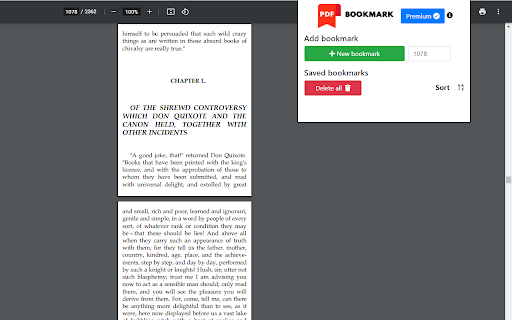
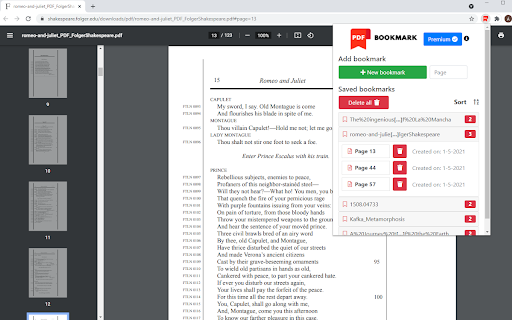
With PDF Bookmark you will be able to:
•    CREATE bookmarks of PDFs on websites or your PC
•    SAVE UNLIMITED pages per book
•    SAVE UNLIMITED PDF files
•    SORT your books alphabetically

Contact us:
- Email: [email protected]
- Website: pdfbookmark.github.io
Grundläggande Information om Tillägg
| Namn |  PDF Bookmark PDF Bookmark |
| ID | mcalpfgelkfeonobdckkjgkgmcmjamgb |
| Officiell webbadress | https://chromewebstore.google.com/detail/pdf-bookmark/mcalpfgelkfeonobdckkjgkgmcmjamgb |
| Beskrivning | The easiest way to have all your PDF file organized! Do you want to have all your books in one place with a bookmark in a specific… |
| Filstorlek | 417 KB |
| Antal Installationer | 3,123 |
| Aktuell Version | 0.2 |
| Senast Uppdaterad | 2021-05-30 |
| Publiceringsdatum | 2021-05-17 |
| Betyg | 4.50/5 Totalt 8 Betyg |
| Utvecklare | overstudiotech |
| E-post | [email protected] |
| Betalningssätt | in_app |
| Tilläggswebbplats | https://pdfbookmark.github.io |
| URL till Sekretesspolicy Sidan | https://pdfbookmark.github.io/privacy_policy.html |
| Stödda Språk | en |
| manifest.json | |
{
"update_url": "https:\/\/clients2.google.com\/service\/update2\/crx",
"name": "PDF Bookmark",
"version": "0.2",
"manifest_version": 2,
"background": {
"scripts": [
"ExtPay.js",
"background.js"
]
},
"content_scripts": [
{
"matches": [
"https:\/\/extensionpay.com\/*"
],
"js": [
"ExtPay.js"
],
"run_at": "document_start"
},
{
"matches": [
" | |