Offsided - Keeper
Screen capture your page and share it with friends
Vad är Offsided - Keeper?
Offsided - Keeper är en Chrome-tillägg utvecklad av http://www.fitbamob.com, och dess huvudfunktion är "Screen capture your page and share it with friends".
Tilläggsskärmbilder
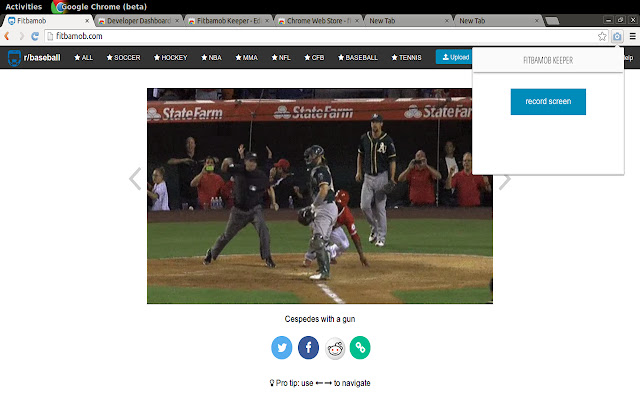


Ladda ner Offsided - Keeper-förlängningens CRX-fil
Ladda ner Offsided - Keeper-filändelser i crx-format, installera Chrome-tillägg manuellt i webbläsaren eller dela crx-filerna med vänner för att enkelt installera Chrome-tillägg.
Användarmanual för Tillägg
                        Easy screen recording with Fitbamob Keeper.

This tool allows you to record and share your screen with friends. All recorded videos are hosted on fitbamob.com for easy sharing. Just send a link or publish it on Reddit/Twitter/Facebook.

Features available:

* Screen recording (no audio)
* Selecting first and last frame
* Cropping video area
* Hosting video file online on fitbamob.com
* Share on social media.

**Update 1.1.0**
* Add preview option
* Bug fixes.
Grundläggande Information om Tillägg
| Namn |  Offsided - Keeper Offsided - Keeper |
| ID | mmfdoaieedekahebigodbflpapoggbkd |
| Officiell webbadress | https://chrome.google.com/webstore/detail/offsided-keeper/mmfdoaieedekahebigodbflpapoggbkd |
| Beskrivning | Screen capture your page and share it with friends |
| Filstorlek | 2.74 MB |
| Antal Installationer | 13 |
| Aktuell Version | 1.2.0 |
| Senast Uppdaterad | 2015-04-14 |
| Publiceringsdatum | 2015-04-14 |
| Betyg | 4.43/5 Totalt 7 Betyg |
| Utvecklare | http://www.fitbamob.com |
| Betalningssätt | free |
| Stödda Språk | en |
| manifest.json | |
{
    "update_url": "https:\/\/clients2.google.com\/service\/update2\/crx",
    "name": "Offsided - Keeper",
    "version": "1.2.0",
    "manifest_version": 2,
    "description": "Screen capture your page and share it with friends",
    "browser_action": {
        "default_icon": "icon.png",
        "default_popup": "popup.html"
    },
    "background": {
        "page": "background.html",
        "persistent": false
    },
    "permissions": [
        "background",
        "tabs",
        "http:\/\/*\/*",
        "https:\/\/*\/*",
        "notifications",
        "activeTab",
        "desktopCapture",
        "tabCapture"
    ],
    "icons": {
        "16": "icon16.png",
        "48": "icon48.png",
        "128": "icon128.png"
    }
} | |