YouTube Next
Use you media keys to control YouTube
Vad är YouTube Next?
YouTube Next är en Chrome-tillägg utvecklad av Team Encil, och dess huvudfunktion är "Use you media keys to control YouTube".
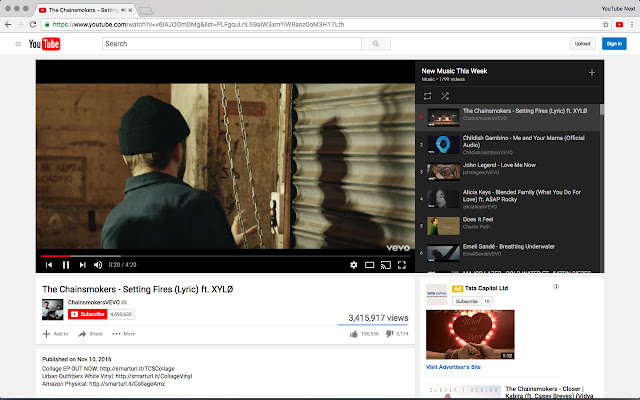
Tilläggsskärmbilder


Ladda ner YouTube Next-förlängningens CRX-fil
Ladda ner YouTube Next-filändelser i crx-format, installera Chrome-tillägg manuellt i webbläsaren eller dela crx-filerna med vänner för att enkelt installera Chrome-tillägg.
Användarmanual för Tillägg
                        Use your Media Keys to control YouTube. To Change a song, Click Next, Pause, Stop etc. from your Keyboard even without opening YouTube.

It's a simple and easy tool, which will help you if you love to hear Music on Youtube.

This extension will be enabled only when you visit YouTube and will be disabled for everything else.
Grundläggande Information om Tillägg
| Namn |  YouTube Next YouTube Next |
| ID | mojigipbndoflnjonbejgkehjdeajlmm |
| Officiell webbadress | https://chrome.google.com/webstore/detail/youtube-next/mojigipbndoflnjonbejgkehjdeajlmm |
| Beskrivning | Use you media keys to control YouTube |
| Filstorlek | 22.7 KB |
| Antal Installationer | 379 |
| Aktuell Version | 0.1 |
| Senast Uppdaterad | 2016-11-11 |
| Publiceringsdatum | 2016-11-11 |
| Betyg | 4.42/5 Totalt 19 Betyg |
| Utvecklare | Team Encil |
| E-post | [email protected] |
| Betalningssätt | free |
| Stödda Språk | en |
| manifest.json | |
{
    "update_url": "https:\/\/clients2.google.com\/service\/update2\/crx",
    "name": "YouTube Next",
    "version": "0.1",
    "icons": {
        "16": "icons\/icon16.png",
        "48": "icons\/icon48.png",
        "128": "icons\/icon128.png"
    },
    "description": "Use you media keys to control YouTube",
    "homepage_url": "http:\/\/youtube.com",
    "permissions": [
        "tabs",
        "contextMenus"
    ],
    "manifest_version": 2,
    "commands": {
        "prev": {
            "suggested_key": {
                "default": "MediaPrevTrack",
                "mac": "MediaPrevTrack"
            },
            "description": "Play Previous Track",
            "global": true
        },
        "play-pause": {
            "suggested_key": {
                "default": "MediaPlayPause",
                "mac": "MediaPlayPause"
            },
            "description": "Play\/Pause Active Audio",
            "global": true
        },
        "next": {
            "suggested_key": {
                "default": "MediaNextTrack",
                "mac": "MediaNextTrack"
            },
            "description": "Play Next Track",
            "global": true
        },
        "stop": {
            "suggested_key": {
                "default": "MediaStop",
                "mac": "MediaStop"
            },
            "description": "Stop Audio",
            "global": true
        }
    },
    "background": {
        "scripts": [
            "background.js"
        ],
        "persistent": true
    },
    "page_action": {
        "default_title": "Use you media keys to control YouTube",
        "default_icon": {
            "19": "icons\/icon19.png",
            "38": "icons\/icon38.png"
        }
    },
    "content_scripts": [
        {
            "matches": [
                "*:\/\/*.youtube.com\/*"
            ],
            "js": [
                "shared.js",
                "youtubenext.js"
            ]
        }
    ]
} | |