PlutusDex Enhancer
Extension to add community based client-side features to PlutusDex
Vad är PlutusDex Enhancer?
PlutusDex Enhancer är en Chrome-tillägg utvecklad av Breaking IT - Sebastian Stohr, och dess huvudfunktion är "Extension to add community based client-side features to PlutusDex".
Tilläggsskärmbilder
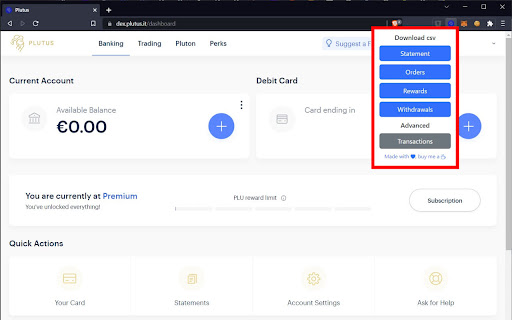
Ladda ner PlutusDex Enhancer-förlängningens CRX-fil
Ladda ner PlutusDex Enhancer-filändelser i crx-format, installera Chrome-tillägg manuellt i webbläsaren eller dela crx-filerna med vänner för att enkelt installera Chrome-tillägg.
Användarmanual för Tillägg
                        Adds csv download of the Banking statement, Pluton rewards, Crypto orders, Withdrawals and Transactions to the Plutus web app.

🚨 ⚠️ This project is no longer under active development. ⚠️ 🚨
Grundläggande Information om Tillägg
| Namn |  PlutusDex Enhancer PlutusDex Enhancer |
| ID | necjdfandaodcoeagkacmlapednbihgl |
| Officiell webbadress | https://chromewebstore.google.com/detail/plutusdex-enhancer/necjdfandaodcoeagkacmlapednbihgl |
| Beskrivning | Extension to add community based client-side features to PlutusDex |
| Filstorlek | 146 KB |
| Antal Installationer | 937 |
| Aktuell Version | 0.8.3 |
| Senast Uppdaterad | 2023-02-04 |
| Publiceringsdatum | 2022-06-08 |
| Betyg | 4.83/5 Totalt 6 Betyg |
| Utvecklare | Breaking IT - Sebastian Stohr |
| E-post | [email protected] |
| Betalningssätt | free |
| Tilläggswebbplats | https://dex.plutus.link/ |
| Hjälpsida URL | https://gitlab.com/_superhero1/plutusdex-enhancer/-/issues |
| Stödda Språk | en |
| manifest.json | |
{
    "update_url": "https:\/\/clients2.google.com\/service\/update2\/crx",
    "name": "PlutusDex Enhancer",
    "description": "Extension to add community based client-side features to PlutusDex",
    "version": "0.8.3",
    "manifest_version": 3,
    "action": {
        "default_popup": "popup.html",
        "default_icon": {
            "16": "\/images\/icon16.png",
            "19": "\/images\/icon19.png",
            "32": "\/images\/icon32.png",
            "38": "\/images\/icon38.png",
            "48": "\/images\/icon48.png",
            "128": "\/images\/icon128.png"
        }
    },
    "content_scripts": [
        {
            "matches": [
                "https:\/\/dex.plutus.it\/dashboard\/*"
            ],
            "js": [
                "content.js"
            ]
        }
    ],
    "permissions": [
        "activeTab",
        "tabs"
    ],
    "icons": {
        "16": "\/images\/icon16.png",
        "19": "\/images\/icon19.png",
        "32": "\/images\/icon32.png",
        "38": "\/images\/icon38.png",
        "48": "\/images\/icon48.png",
        "128": "\/images\/icon128.png"
    }
} | |