Clipou: Clipboard History Manager
Manage all your Clipps in one app
Vad är Clipou: Clipboard History Manager?
Clipou: Clipboard History Manager är en Chrome-tillägg utvecklad av Extensions And Co, och dess huvudfunktion är "Manage all your Clipps in one app".
Tilläggsskärmbilder
Ladda ner Clipou: Clipboard History Manager-förlängningens CRX-fil
Ladda ner Clipou: Clipboard History Manager-filändelser i crx-format, installera Chrome-tillägg manuellt i webbläsaren eller dela crx-filerna med vänner för att enkelt installera Chrome-tillägg.
Användarmanual för Tillägg
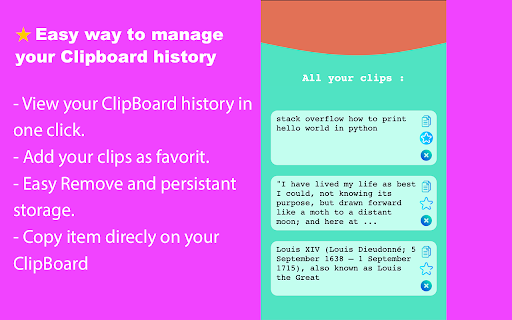
                        Quickly manage and list copied text.

Clipou will store the text you've copied across the web and allow you to manage it easily.

Features :

- Manage your ClipBoard history.
- Add Clips by Ctrl + C or Click and Copy
- Add your Clips as favorits.
- Delete your Clips.

Notes :
- Clipou will ignore copied text from password fields.
- You Must reopen Chrome after installation.
Grundläggande Information om Tillägg
| Namn |  Clipou: Clipboard History Manager Clipou: Clipboard History Manager |
| ID | npfghbanedhpdmbnnbiacklepppgfbid |
| Officiell webbadress | https://chromewebstore.google.com/detail/clipou-clipboard-history/npfghbanedhpdmbnnbiacklepppgfbid |
| Beskrivning | Manage all your Clipps in one app |
| Filstorlek | 104 KB |
| Antal Installationer | 31 |
| Aktuell Version | 1.0.0 |
| Senast Uppdaterad | 2022-10-24 |
| Publiceringsdatum | 2022-10-23 |
| Betyg | 5.00/5 Totalt 1 Betyg |
| Utvecklare | Extensions And Co |
| E-post | [email protected] |
| Betalningssätt | free |
| Stödda Språk | en |
| manifest.json | |
{
    "update_url": "https:\/\/clients2.google.com\/service\/update2\/crx",
    "name": "__MSG_ext_name__",
    "description": "__MSG_ext_description__",
    "version": "1.0.0",
    "manifest_version": 3,
    "default_locale": "en",
    "icons": {
        "16": "images\/icon16.png",
        "24": "images\/icon24.png",
        "32": "images\/icon32.png",
        "48": "images\/icon48.png",
        "128": "images\/icon128.png"
    },
    "permissions": [
        "storage",
        "unlimitedStorage",
        "contextMenus"
    ],
    "background": {
        "service_worker": "background.js",
        "type": "module"
    },
    "content_scripts": [
        {
            "matches": [
                "http:\/\/*\/*",
                "https:\/\/*\/*"
            ],
            "js": [
                "js\/content-script.js"
            ]
        }
    ],
    "action": {
        "default_title": "__MSG_ext_name__",
        "default_popup": "html\/popup.html"
    },
    "commands": {
        "_execute_action": {
            "suggested_key": {
                "default": "Ctrl+Shift+P",
                "mac": "Command+Shift+P"
            }
        }
    }
} | |