CIP - Picture In Picture (AKA. PIP) player
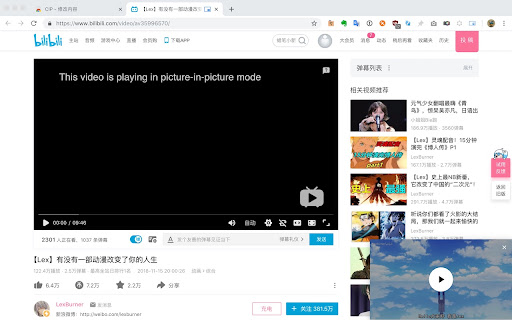
Play video in Picture-In-Picture mode (aka. PIP)
Vad är CIP - Picture In Picture (AKA. PIP) player?
CIP - Picture In Picture (AKA. PIP) player är en Chrome-tillägg utvecklad av ufo22940268, och dess huvudfunktion är "Play video in Picture-In-Picture mode (aka. PIP)".
Tilläggsskärmbilder
Ladda ner CIP - Picture In Picture (AKA. PIP) player-förlängningens CRX-fil
Ladda ner CIP - Picture In Picture (AKA. PIP) player-filändelser i crx-format, installera Chrome-tillägg manuellt i webbläsaren eller dela crx-filerna med vänner för att enkelt installera Chrome-tillägg.
Användarmanual för Tillägg
                        CIP is short for Cat In Picture. It can let you trigger Picture In Picture window in chrome browser.

How to use it

When you browser a page with a html5 player in it, and then click the extension icon. Then the video will be played in a floating window.

Tested in following websites

- https://www.twitch.tv/
- https://youtube.com/
- https://www.douyu.com/ (Using html5 player)
- https://www.bilibili.com/

The extension should works on other websites as well.

Source code:  https://github.com/ufo22940268/CIP
Grundläggande Information om Tillägg
| Namn |  CIP - Picture In Picture (AKA. PIP) player CIP - Picture In Picture (AKA. PIP) player |
| ID | oacpifbefgeacllmohgglfjmgchadkjh |
| Officiell webbadress | https://chromewebstore.google.com/detail/cip-picture-in-picture-ak/oacpifbefgeacllmohgglfjmgchadkjh |
| Beskrivning | Play video in Picture-In-Picture mode (aka. PIP) |
| Filstorlek | 9.67 KB |
| Antal Installationer | 962 |
| Aktuell Version | 1.2 |
| Senast Uppdaterad | 2018-11-23 |
| Publiceringsdatum | 2018-11-23 |
| Betyg | 4.45/5 Totalt 11 Betyg |
| Utvecklare | ufo22940268 |
| E-post | [email protected] |
| Betalningssätt | free |
| Tilläggswebbplats | https://github.com/ufo22940268/CIP |
| Stödda Språk | en |
| manifest.json | |
{
    "update_url": "https:\/\/clients2.google.com\/service\/update2\/crx",
    "name": "CIP - Picture In Picture (AKA. PIP) player",
    "version": "1.2",
    "description": "Play video in Picture-In-Picture mode (aka. PIP)",
    "background": {
        "scripts": [
            "background.js"
        ],
        "persistent": false
    },
    "icons": {
        "16": "images\/icon16.png",
        "32": "images\/icon32.png",
        "48": "images\/icon48.png",
        "128": "images\/icon128.png"
    },
    "permissions": [
        "background",
        "activeTab"
    ],
    "browser_action": [],
    "manifest_version": 2
} | |