Khiyo Dictionary
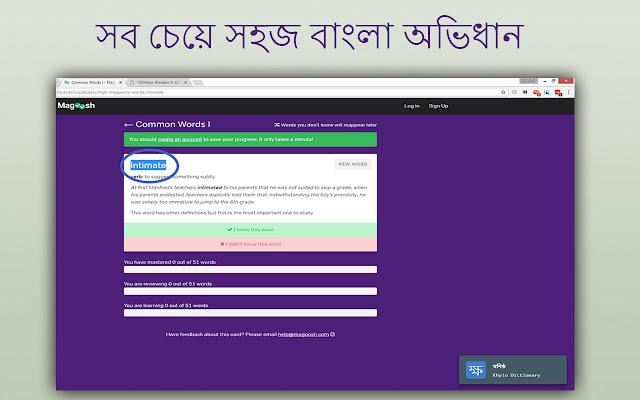
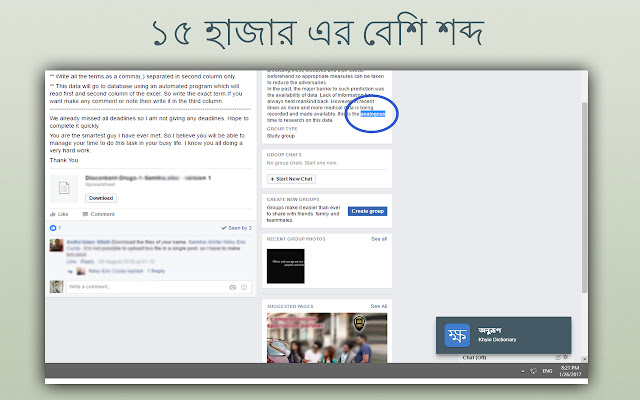
A simple clean Chrome extension that gives you the actual bangla meaning of selected english word while browsing any website
Vad är Khiyo Dictionary?
Khiyo Dictionary är en Chrome-tillägg utvecklad av Shemul Hossain, och dess huvudfunktion är "A simple clean Chrome extension that gives you the actual bangla meaning of selected english word while browsing any website".
Tilläggsskärmbilder

Ladda ner Khiyo Dictionary-förlängningens CRX-fil
Ladda ner Khiyo Dictionary-filändelser i crx-format, installera Chrome-tillägg manuellt i webbläsaren eller dela crx-filerna med vänner för att enkelt installera Chrome-tillägg.
Användarmanual för Tillägg
                        A Simple Chrome extension that get you the actual Bangla meaning of selected English word.

How to :
---------------------------

Just install it and keep surfing the web , whenever you want to mean any word just give a double click on that word. Hopefully associated Bangla Mean will be appear bottom-right corner

Remember : You must have to refresh your current page if you want to see just in action
Grundläggande Information om Tillägg
| Namn |  Khiyo Dictionary Khiyo Dictionary |
| ID | oncfhhecjhlmbbimgloeegaopmgbolif |
| Officiell webbadress | https://chrome.google.com/webstore/detail/khiyo-dictionary/oncfhhecjhlmbbimgloeegaopmgbolif |
| Beskrivning | A simple clean Chrome extension that gives you the actual bangla meaning of selected english word while browsing any website |
| Filstorlek | 111 KB |
| Antal Installationer | 269 |
| Aktuell Version | 1.3.3 |
| Senast Uppdaterad | 2018-05-15 |
| Publiceringsdatum | 2018-05-15 |
| Betyg | 4.64/5 Totalt 22 Betyg |
| Utvecklare | Shemul Hossain |
| E-post | [email protected] |
| Betalningssätt | free |
| Stödda Språk | en |
| manifest.json | |
{
    "update_url": "https:\/\/clients2.google.com\/service\/update2\/crx",
    "manifest_version": 2,
    "version": "1.3.3",
    "name": "Khiyo Dictionary",
    "short_name": "Khiyo",
    "description": "A simple clean Chrome extension that gives you the actual bangla meaning of selected english word while browsing any website",
    "homepage_url": "https:\/\/github.com\/shemul",
    "author": {
        "name": "Shemul Hossain"
    },
    "browser_action": {
        "default_icon": "icon38.png"
    },
    "icons": {
        "64": "icon.png",
        "16": "icon16.png",
        "48": "icon48.png",
        "128": "icon128.png"
    },
    "content_scripts": [
        {
            "matches": [
                "*:\/\/*\/*"
            ],
            "js": [
                "js\/jquery.js",
                "js\/content.js"
            ],
            "css": [
                "js\/content.css"
            ],
            "run_at": "document_end"
        }
    ]
} | |