Freeze DOM
Freeze the DOM instantly
Vad är Freeze DOM?
Freeze DOM är en Chrome-tillägg utvecklad av https://nemothecollector.dev, och dess huvudfunktion är "Freeze the DOM instantly".
Tilläggsskärmbilder

Ladda ner Freeze DOM-förlängningens CRX-fil
Ladda ner Freeze DOM-filändelser i crx-format, installera Chrome-tillägg manuellt i webbläsaren eller dela crx-filerna med vänner för att enkelt installera Chrome-tillägg.
Användarmanual för Tillägg
                        Pause the DOM on demand for testing and debugging purpose.

How to use:
- Step 0: Open DevTools Panel (F12 or Right Click -> select 'Inspect')
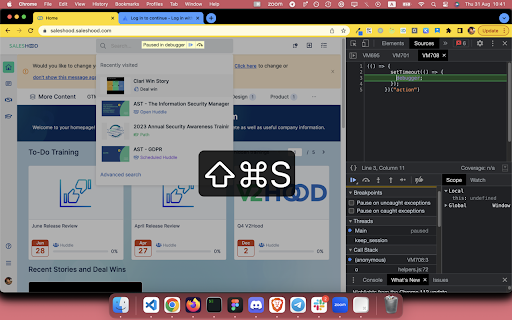
- Step 1: Right Click -> select 'Freeze DOM'  or Press Cmd + Shift + S (on Mac) / Cmd + Shift + S (on Window, Ubuntu)

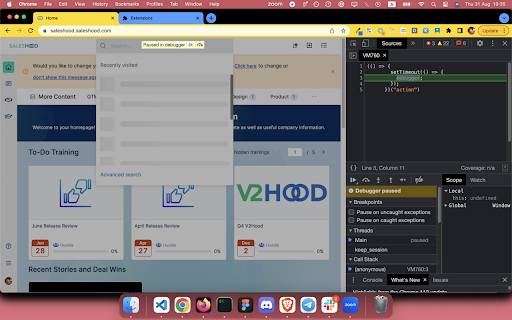
Right click on tab content and choose "Freeze DOM" (while devtool panel is open) to freeze the state of website on demand.

With a frozen DOM, you can:
- Inspect an UI part that only available while hovered / focused (for example: keeping the auto complete dropdown of a text input visible)
- Take a snapshot of an in-progress state (for example: loading state)


🔭 Explore more dev tools at: https://nemothecollector.dev/products

Note: The shortcut might be overridden by built-in settings of some browsers for example Arc and Microsoft Edge. To fix it:
- For Arc: go to arc://extensions/shortcuts and update the shortkeys
- For Microsoft Edge: follow this instruction https://www.webnots.com/how-to-assign-keyboard-shortcut-to-extension-in-microsoft-edge/
Grundläggande Information om Tillägg
| Namn |  Freeze DOM Freeze DOM |
| ID | onekmnelbichmlnmkecckkjjljifhefg |
| Officiell webbadress | https://chromewebstore.google.com/detail/freeze-dom/onekmnelbichmlnmkecckkjjljifhefg |
| Beskrivning | Freeze the DOM instantly |
| Filstorlek | 34.97 KB |
| Antal Installationer | 498 |
| Aktuell Version | 0.0.1 |
| Senast Uppdaterad | 2024-01-30 |
| Publiceringsdatum | 2023-08-31 |
| Betyg | 5.00/5 Totalt 4 Betyg |
| Utvecklare | https://nemothecollector.dev |
| E-post | [email protected] |
| Betalningssätt | free |
| Stödda Språk | en |
| manifest.json | |
{
    "update_url": "https:\/\/clients2.google.com\/service\/update2\/crx",
    "name": "Freeze DOM",
    "version": "0.0.1",
    "description": "Freeze the DOM instantly",
    "manifest_version": 3,
    "permissions": [
        "contextMenus",
        "scripting",
        "activeTab"
    ],
    "commands": {
        "freeze-dom": {
            "suggested_key": "Ctrl+Shift+S",
            "description": "Freeze the DOM instantly"
        }
    },
    "icons": {
        "16": "icon16.png",
        "32": "icon32.png",
        "48": "icon48.png",
        "128": "icon128.png"
    },
    "background": {
        "service_worker": "background.js"
    }
} | |