Form Hero: a HTML form auto-filler (Beta)
Form Hero can remember your inputs, and speed your form filling process later. He really wants to be your hero!
Vad är Form Hero: a HTML form auto-filler (Beta)?
Form Hero: a HTML form auto-filler (Beta) är en Chrome-tillägg utvecklad av t.k., och dess huvudfunktion är "Form Hero can remember your inputs, and speed your form filling process later. He really wants to be your hero!".
Tilläggsskärmbilder
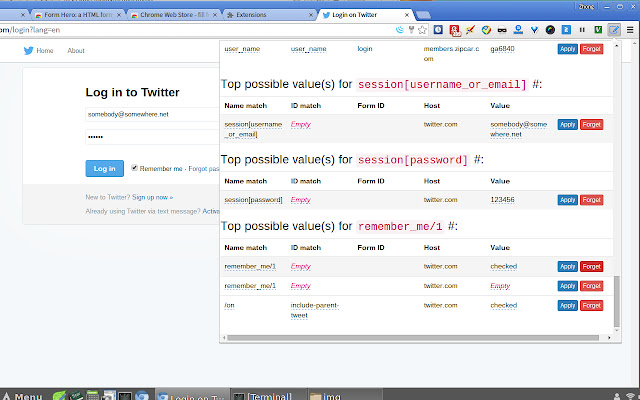
Ladda ner Form Hero: a HTML form auto-filler (Beta)-förlängningens CRX-fil
Ladda ner Form Hero: a HTML form auto-filler (Beta)-filändelser i crx-format, installera Chrome-tillägg manuellt i webbläsaren eller dela crx-filerna med vänner för att enkelt installera Chrome-tillägg.
Användarmanual för Tillägg
                        Are you an ambitious job seeker who dreams to submit hundred applications a day?
Or you got too many usernames and passwords to remember?
Or tired of getting unexpected results from Chrome Autofill?

Form Hero author knows how painful it is! He wishes Form Hero can be a helpful  assistant for you.

Form Hero is not limited to save your login names or email addresses, it can help you remember almost any inputs on websites! Forms, checkboxes, dropdown manuals and whatsoever inputs you need to remember.

With a single click, you can instantly apply values to specific/all blanks.
No need to copy and paste frequently used information any more!

And, it is free! So why not try it now and get an easy life?

Typically, to use Form Hero you need:

Step 1: Click ``remember all filled values" button to inform Form Hero to remember the inputs.

Step 2: When you see this form again, or even a similar form from other websites, you can fill each blanks by a single click on one of the suggested candidates, or apply default values to all inputs, again with only one click.

Note: Form Hero ranks the top possible candidate values for you, the very first one for each input is the most likely value that Form Hero suggests for you. So you have more options: You can choose to fill or not to fill, and which value to fill (this is the fundamental difference that distinguishes Form Hero from other similar auto-filler apps/extensions).

Form Hero is just in his beta version, please send any feedback you have to author email address: [email protected]

Form Hero really wants to be your hero!
Grundläggande Information om Tillägg
| Namn |  Form Hero: a HTML form auto-filler (Beta) Form Hero: a HTML form auto-filler (Beta) |
| ID | pelaeciljekjlkaampohnboacfhjobod |
| Officiell webbadress | https://chrome.google.com/webstore/detail/form-hero-a-html-form-aut/pelaeciljekjlkaampohnboacfhjobod |
| Beskrivning | Form Hero can remember your inputs, and speed your form filling process later. He really wants to be your hero! |
| Filstorlek | 766 KB |
| Antal Installationer | 1,000 |
| Aktuell Version | 15.12.12.21 |
| Senast Uppdaterad | 2015-12-12 |
| Publiceringsdatum | 2015-12-12 |
| Betyg | 3.63/5 Totalt 8 Betyg |
| Utvecklare | t.k. |
| E-post | [email protected] |
| Betalningssätt | free |
| Stödda Språk | en |
| manifest.json | |
{
"update_url": "https:\/\/clients2.google.com\/service\/update2\/crx",
"name": "Form Hero: a HTML form auto-filler (Beta)",
"short_name": "Form Hero",
"version": "15.12.12.21",
"manifest_version": 2,
"permissions": [
" | |