ReadingBuddies
Tools for easier reading.
ReadingBuddiesคืออะไร?
ReadingBuddies เป็นส่วนขยายของ Chrome ที่พัฒนาโดย readingbuddiesapp และคุณลักษณะหลักของมันคือ "Tools for easier reading."
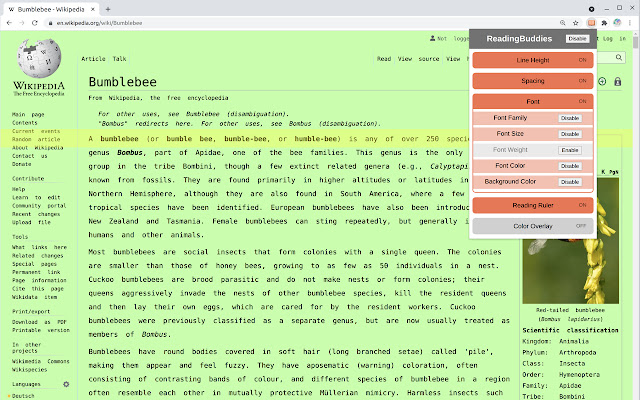
ภาพหน้าจอของส่วนขยาย


ดาวน์โหลดไฟล์ CRX ของส่วนขยาย ReadingBuddies
ดาวน์โหลดไฟล์ส่วนขยาย ReadingBuddies ในรูปแบบ crx และติดตั้งส่วนขยาย Chrome ด้วยตนเองในเบราว์เซอร์หรือแชร์ไฟล์ crx กับเพื่อนๆ เพื่อติดตั้งส่วนขยาย Chrome อย่างง่ายดาย
คำแนะนำในการใช้ส่วนขยาย
                        ReadingBuddies allows you to adjust visual elements on webpages for accessibility, style, and easy reading.

Features:
    -  Reading ruler, a horizontal highlight bar that follows the mouse
    -  Adjust line spacing between text
    -  Adjust spacing between words and characters
    -  Adjust fonts, font size, and font weight
    -  Adjust font and background colors
    -  Add color filters over webpages
    -  Colorful themes! Right click extension icon, choose options, and pick a color

ReadingBuddies does not contain ads and is free forever.  ReadingBuddies respects your privacy and does not track any web activity.
ข้อมูลพื้นฐานของส่วนขยาย
| ชื่อ |  ReadingBuddies ReadingBuddies |
| ID | adfjlknhfdbnfajbdlhilnbepfnemigm |
| URL อย่างเป็นทางการ | https://chrome.google.com/webstore/detail/readingbuddies/adfjlknhfdbnfajbdlhilnbepfnemigm |
| คำอธิบาย | Tools for easier reading. |
| ขนาดไฟล์ | 33.41 KB |
| จำนวนการติดตั้ง | 307 |
| เวอร์ชันปัจจุบัน | 0.22 |
| อัปเดตครั้งล่าสุด | 2022-07-21 |
| วันที่เผยแพร่ | 2020-07-23 |
| คะแนน | 4.75/5 รวมทั้งหมด 4 คะแนน |
| ผู้พัฒนา | readingbuddiesapp |
| อีเมล | [email protected] |
| ประเภทการชำระเงิน | free |
| URL หน้าช่วยเหลือ | https://github.com/jordanpemberton/ReadingBuddies/ |
| ภาษาที่รองรับ | en-US |
| manifest.json | |
{
    "update_url": "https:\/\/clients2.google.com\/service\/update2\/crx",
    "name": "ReadingBuddies",
    "description": "Tools for easier reading.",
    "version": "0.22",
    "manifest_version": 2,
    "permissions": [
        "storage",
        "tabs",
        "http:\/\/*\/*",
        "https:\/\/*\/*"
    ],
    "background": {
        "scripts": [
            "background.js"
        ],
        "persistent": false
    },
    "browser_action": {
        "default_title": "ReadingBuddies",
        "default_popup": "popup.html",
        "default_icon": {
            "16": "icons\/icon16.png",
            "32": "icons\/icon32.png",
            "48": "icons\/icon48.png"
        }
    },
    "options_page": "user_settings.html",
    "icons": {
        "16": "icons\/icon16.png",
        "32": "icons\/icon32.png",
        "48": "icons\/icon48.png",
        "128": "icons\/icon128.png"
    }
} | |