Add to Bookmax
Add Bookmarks to your Bookmax Account.
Add to Bookmaxคืออะไร?
Add to Bookmax เป็นส่วนขยายของ Chrome ที่พัฒนาโดย http://my.bookmax.net และคุณลักษณะหลักของมันคือ "Add Bookmarks to your Bookmax Account."
ภาพหน้าจอของส่วนขยาย
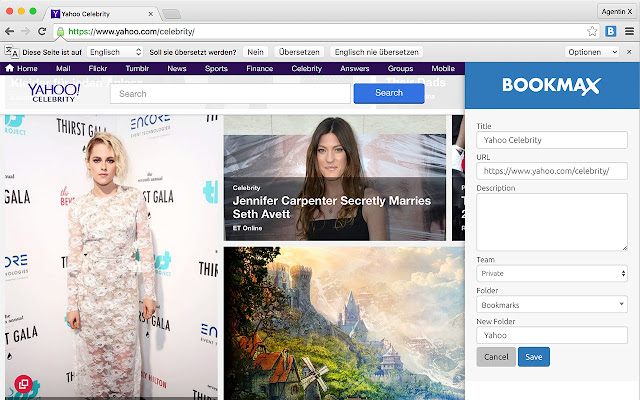

ดาวน์โหลดไฟล์ CRX ของส่วนขยาย Add to Bookmax
ดาวน์โหลดไฟล์ส่วนขยาย Add to Bookmax ในรูปแบบ crx และติดตั้งส่วนขยาย Chrome ด้วยตนเองในเบราว์เซอร์หรือแชร์ไฟล์ crx กับเพื่อนๆ เพื่อติดตั้งส่วนขยาย Chrome อย่างง่ายดาย
คำแนะนำในการใช้ส่วนขยาย
                        Add Bookmarks to your Bookmax Account.

Bookmax.net is an online bookmark manager to store bookmarks, lists, contacts, memos, notes and more online.

Share all your bookmarks and data in teams!

Features:
Hierarchical Folders
Easy drag and drop handling
Search function for all your entries
Search bookmarks
Favorites
3 kind of bookmarks views with thumbshots or favicons

There is also an App for your Bookmax bookmark list, right here on the Chrome App Store.

Datenschutzerklärung: https://www.bookmax.net/datenschutzerklaerung
Privacy Policy: https://www.bookmax.net/privacy-policy
ข้อมูลพื้นฐานของส่วนขยาย
| ชื่อ |  Add to Bookmax Add to Bookmax |
| ID | aebecfmhkadmehbpadebjabkhidmcdcm |
| URL อย่างเป็นทางการ | https://chrome.google.com/webstore/detail/add-to-bookmax/aebecfmhkadmehbpadebjabkhidmcdcm |
| คำอธิบาย | Add Bookmarks to your Bookmax Account. |
| ขนาดไฟล์ | 777 KB |
| จำนวนการติดตั้ง | 922 |
| เวอร์ชันปัจจุบัน | 3.2 |
| อัปเดตครั้งล่าสุด | 2020-02-29 |
| วันที่เผยแพร่ | 2020-02-29 |
| คะแนน | 4.76/5 รวมทั้งหมด 17 คะแนน |
| ผู้พัฒนา | http://my.bookmax.net |
| อีเมล | [email protected] |
| ประเภทการชำระเงิน | free |
| เว็บไซต์ส่วนขยาย | http://www.bookmax.net |
| URL หน้านโยบายความเป็นส่วนตัว | https://www.bookmax.net/datenschutzerklaerung |
| ภาษาที่รองรับ | en |
| manifest.json | |
{
"update_url": "https:\/\/clients2.google.com\/service\/update2\/crx",
"manifest_version": 2,
"name": "Add to Bookmax",
"description": "Add Bookmarks to your Bookmax Account.",
"version": "3.2",
"browser_action": {
"default_icon": "icon-32.png"
},
"icons": {
"32": "icon-32.png",
"128": "icon-128.png"
},
"background": {
"scripts": [
"background.js"
]
},
"content_scripts": [
{
"matches": [
" | |