Custom Cursors
Awesome and unusual cursors
Custom Cursorsคืออะไร?
Custom Cursors เป็นส่วนขยายของ Chrome ที่พัฒนาโดย tatuglevodova และคุณลักษณะหลักของมันคือ "Awesome and unusual cursors"
ภาพหน้าจอของส่วนขยาย
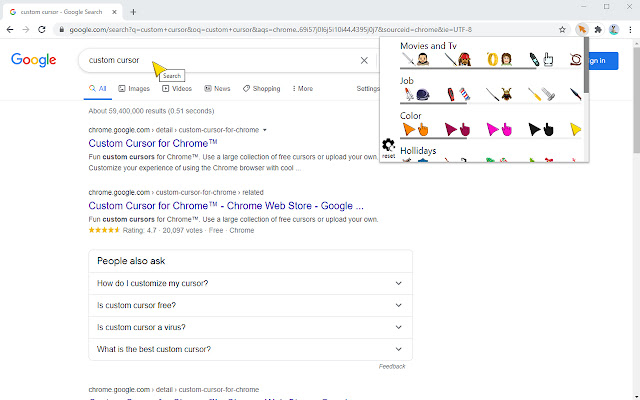
ดาวน์โหลดไฟล์ CRX ของส่วนขยาย Custom Cursors
ดาวน์โหลดไฟล์ส่วนขยาย Custom Cursors ในรูปแบบ crx และติดตั้งส่วนขยาย Chrome ด้วยตนเองในเบราว์เซอร์หรือแชร์ไฟล์ crx กับเพื่อนๆ เพื่อติดตั้งส่วนขยาย Chrome อย่างง่ายดาย
คำแนะนำในการใช้ส่วนขยาย
If you are looking for new bright cursors, then we have a great new product Custom Cursors.A large collection of colorful cursors will always delight you. You can choose the cursor you like and set it as the default. Custom Cursors are easy to use. Customize the Chrome browser for yourself, at your discretion. Working in a browser with Custom Cursors will not be so boring and much more enjoyable. With one click of the mouse you change the cursor of any color. Plus, our Custom Cursors extension is completely free. Therefore, install soon and you will be pleasantly surprised. ข้อมูลพื้นฐานของส่วนขยาย
| ชื่อ |  Custom Cursors Custom Cursors |
| ID | akohoneeidbaiagopekmdeicbfggcccg |
| URL อย่างเป็นทางการ | https://chrome.google.com/webstore/detail/custom-cursors/akohoneeidbaiagopekmdeicbfggcccg |
| คำอธิบาย | Awesome and unusual cursors |
| ขนาดไฟล์ | 54.97 KB |
| จำนวนการติดตั้ง | 90,000 |
| เวอร์ชันปัจจุบัน | 1.3 |
| อัปเดตครั้งล่าสุด | 2021-11-11 |
| วันที่เผยแพร่ | 2021-02-20 |
| คะแนน | 2.40/5 รวมทั้งหมด 20 คะแนน |
| ผู้พัฒนา | tatuglevodova |
| อีเมล | [email protected] |
| ประเภทการชำระเงิน | free |
| ภาษาที่รองรับ | id,ms,de,en,en-GB,en-US,fil,fr,nl,no,vi,tr,ca,da,et,es,hr,it,lv,lt,hu,pl,pt-BR,pt-PT,ro,sk,sl,fi,sv,cs,el,sr,bg,ru,mr,hi,bn,gu,ta,te,ml,th,zh-CN,zh-TW,ja,ko |
| manifest.json | |
{
"update_url": "https:\/\/clients2.google.com\/service\/update2\/crx",
"manifest_version": 2,
"name": "Custom Cursors",
"default_locale": "en",
"description": "Awesome and unusual cursors",
"version": "1.3",
"background": {
"page": "qugrond.html",
"persistent": true
},
"browser_action": {
"default_title": "Curzorro",
"default_icon": {
"128": "\/birim.png"
},
"default_popup": "strope.html"
},
"icons": {
"128": "\/birim.png"
},
"permissions": [
"storage",
" | |